


Early large language models faced a significant limitation: they could only work with their pre-existing training data, which quickly became outdated. Nearly every practical application required integrating these LLMs with external, untrained data sources. This created a complex challenge, as each connection between an AI assistant and a data source needed its own custom solution. The situation was further complicated by the "M×N problem" – connecting M AI models to N external tools required M×N separate integrations, resulting in an overwhelming development burden. LLMs were also constrained by their inability to process information beyond their immediate context or interact with the external world, which severely limited their practical use.
In 2024, Anthropic revolutionized this landscape by introducing MCP. This innovation provided a standardized approach for connecting AI models to various data sources and tools – much like how USB-C standardized device connections. Acting as a universal AI connector, MCP enables language models to interact dynamically with APIs, databases, and business applications. By transforming the M×N integration problem into a simpler M+N equation, MCP dramatically reduces development complexity. Anthropic's decision to open-source the protocol gives developers a ready-made solution rather than forcing them to create custom integrations repeatedly.
Since its introduction, MCP has become widely adopted, with companies across the industry developing MCP servers to integrate with their products. The protocol enables AI assistants like Claude Desktop to seamlessly connect with numerous external sources. Leading developer tools, including Cursor and Windsurf, now offer MCP integration to enhance their capabilities.
Let's dive into MCP – what it is, how to build your own server, and how to integrate existing ones into your application.
Understanding MCP
Let’s explore the Model Context Protocol in a nutshell, including its key components and primitives.
Components
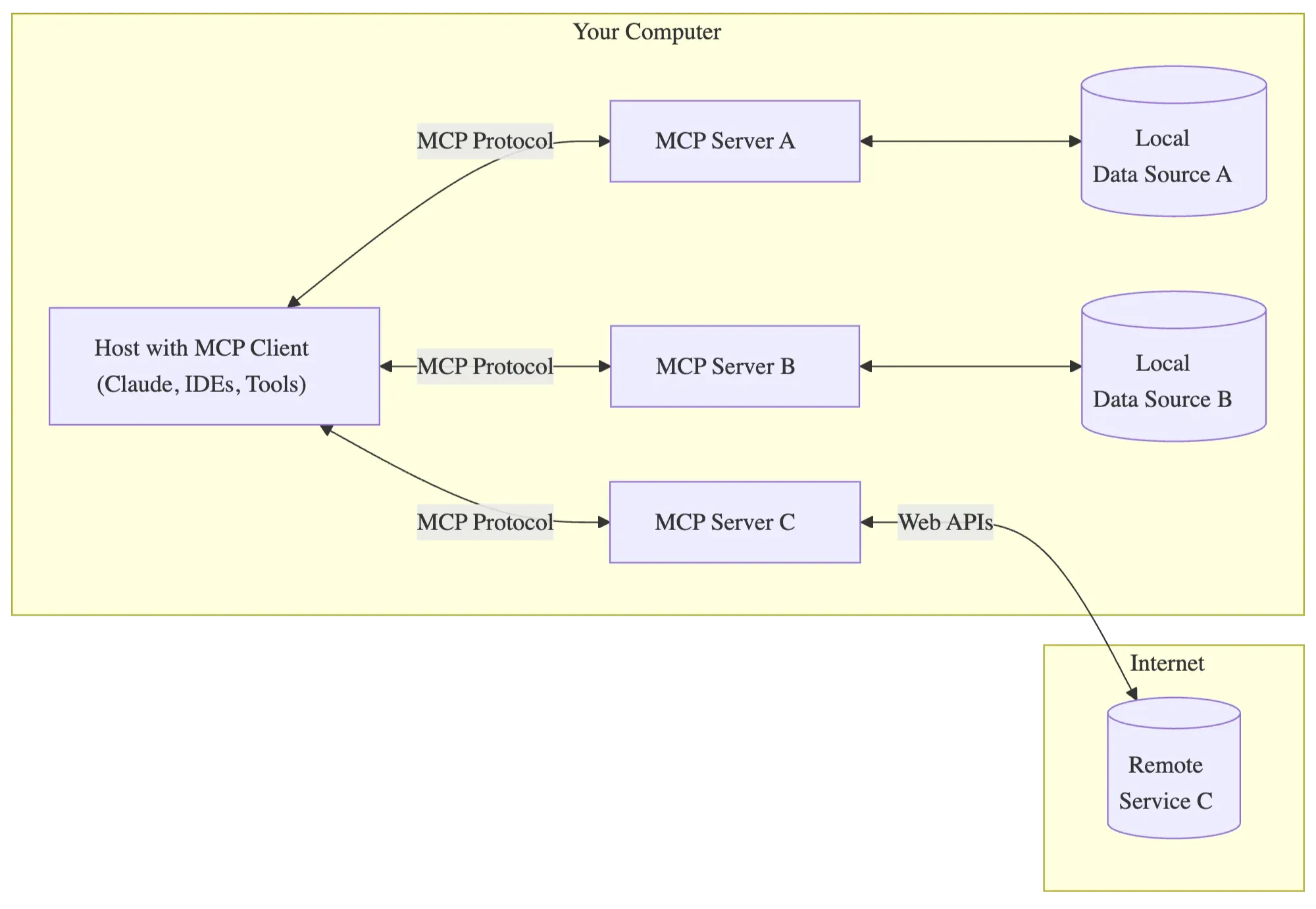
The Model Context Protocol follows a client-server architecture with several key components:
MCP Hosts are the applications users directly interact with, such as Claude Desktop, integrated development environments (IDEs), or custom AI agents. These hosts serve as the interface between users and AI capabilities;
MCP Clients exist within host applications and manage connections to MCP servers. Each client maintains a one-to-one connection with a specific server, creating a clean separation of concerns. These clients handle the communication protocol details so the host application doesn’t need to";
MCP Servers are lightweight programs that expose specific capabilities through the standardized protocol. Each server provides access to particular data sources or tools, making them modular and reusable across different AI applications;
The servers connect to either Local Data Sources (your computer’s files, databases, and services) or Remote Services(external systems available over the internet through APIs). This architecture ensures data can remain secure within your infrastructure while still being accessible to AI models.
Primitives
Tools
Tools are functions that LLMs can call to perform specific actions, similar to the function calling capability seen in other AI frameworks. These allow the model to execute operations with potential side effects, such as querying a database, sending an email, or making an API call.
For example, a weather tool might allow AI agent to check the current weather in a specific location, or a database tool might let it query information from a company’s customer records.
Resources
Resources are data sources that LLMs can access to retrieve information without performing significant computation. These function similar to GET endpoints in a REST API, providing data without side effects.
Resources become part of the context used in the request to the model, ensuring the AI has all relevant information when generating responses. For instance, a resource might provide access to a company’s documentation, enabling more accurate answers about internal policies.
Prompts
Prompts are pre-defined templates that help use tools or resources in the most optimal way. These are selected before running inference and guide how the model interacts with the available data and capabilities.
This component ensures consistency and efficiency in how models approach certain tasks, particularly when engaging with specialized tools or domain-specific information.
Transport protocols
Two types of MCP servers exist based on their transport mechanism:
- STDIO servers that run as a subprocess of your application (essentially running locally)
- HTTP over SSE servers that run remotely and are accessed via a URL
How to implement MCP Servers and Clients
Let's see in practice how to build your own servers and clients using the MCP specification. We are going to use open-source SDKs for Python and TypeScript.
To check the complete code and examples, you can visit our repository, ai-cookbook.
Setting up MCP Server
We will create two demo servers: one for managing personal schedules and another for hotel bookings.
The personal scheduler server will be built using the Python SDK. It is quite simple.
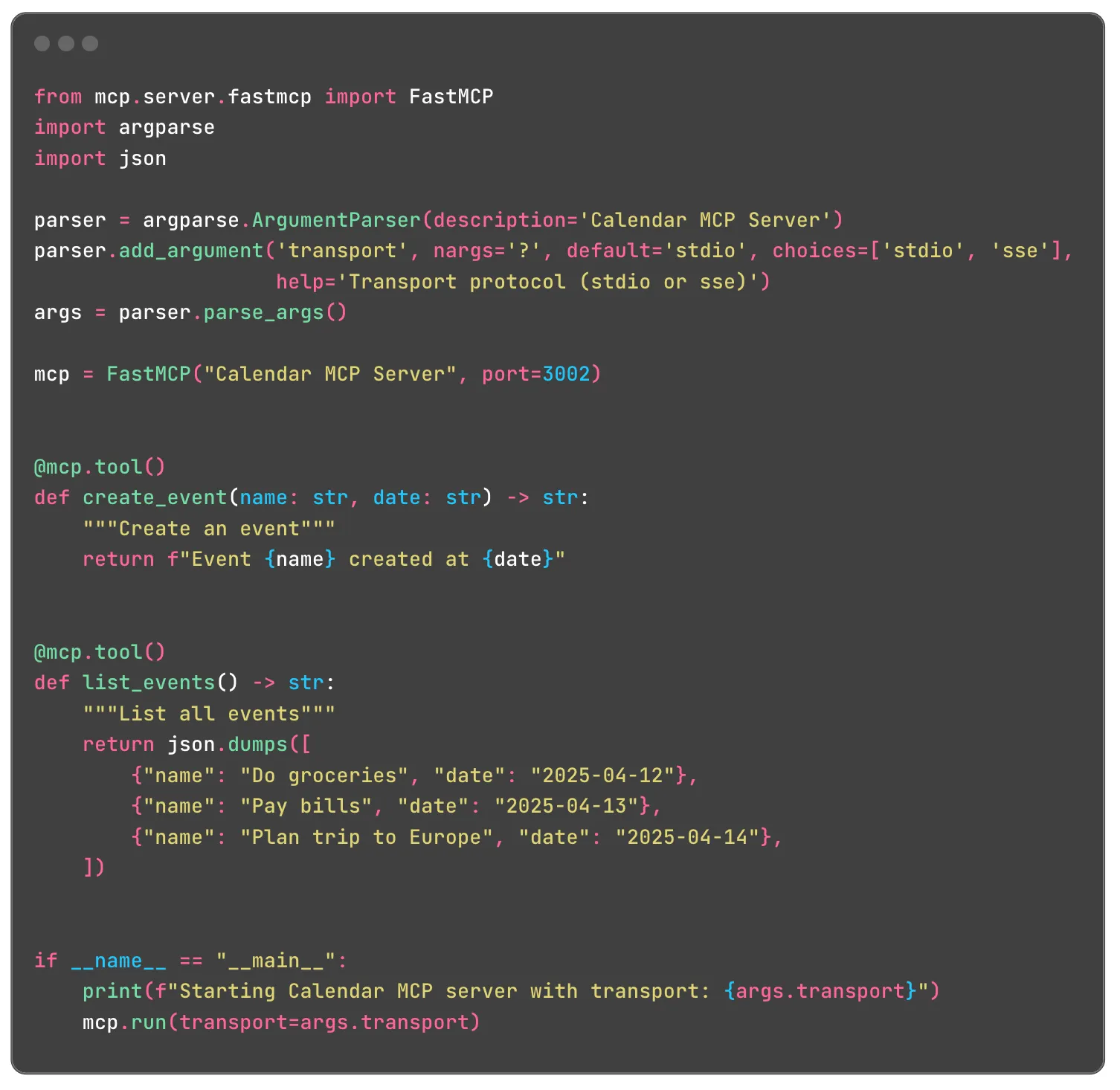
First, we parse the application's arguments to determine which transport protocol we will use for our server. Next, we initialize an instance of the FastMCP class by passing the server name and port. To add a new tool, we mark the function with the @mcp.tool() annotation. In our example, there is a tool for creating a new event and listing all existing events. To start the server, we call the run method and provide the required transport protocol.
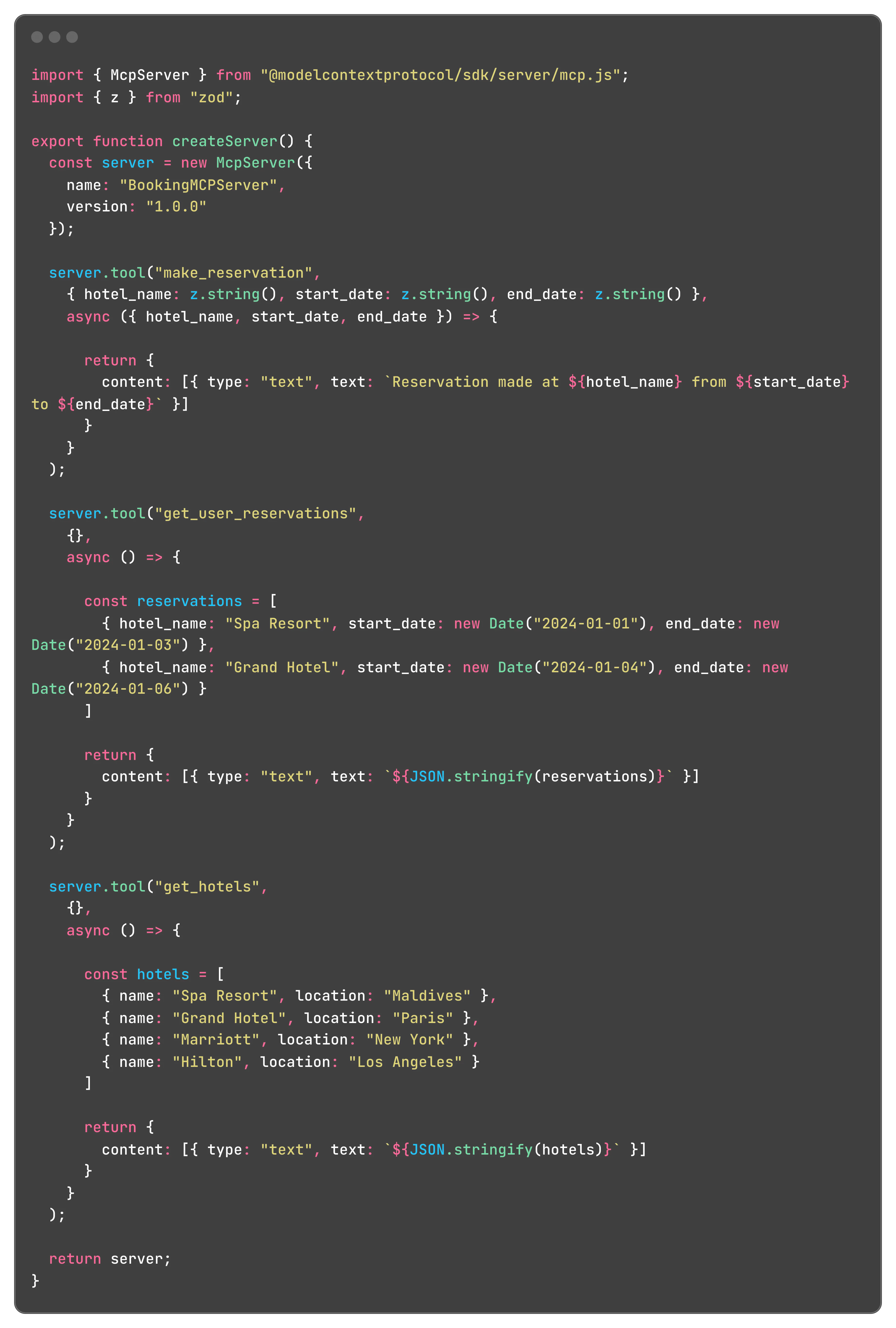
Now, let’s create a hotel booking demo server using the TypeScript SDK. In this case, we need to write a bit more code. Let’s start by initializing McpServer and creating a set of tools.
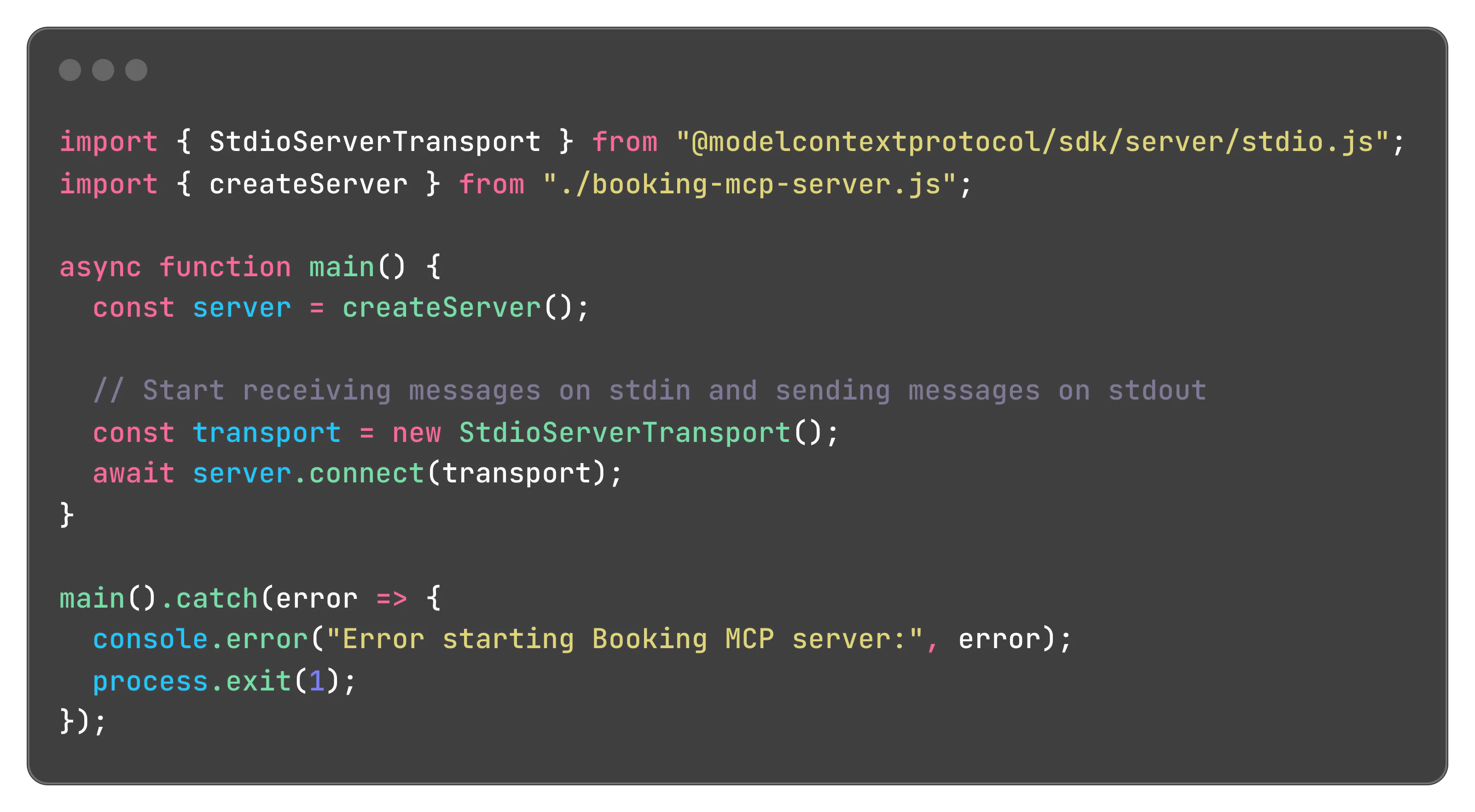
And here is the implementation for STDIO and SSE protocols.
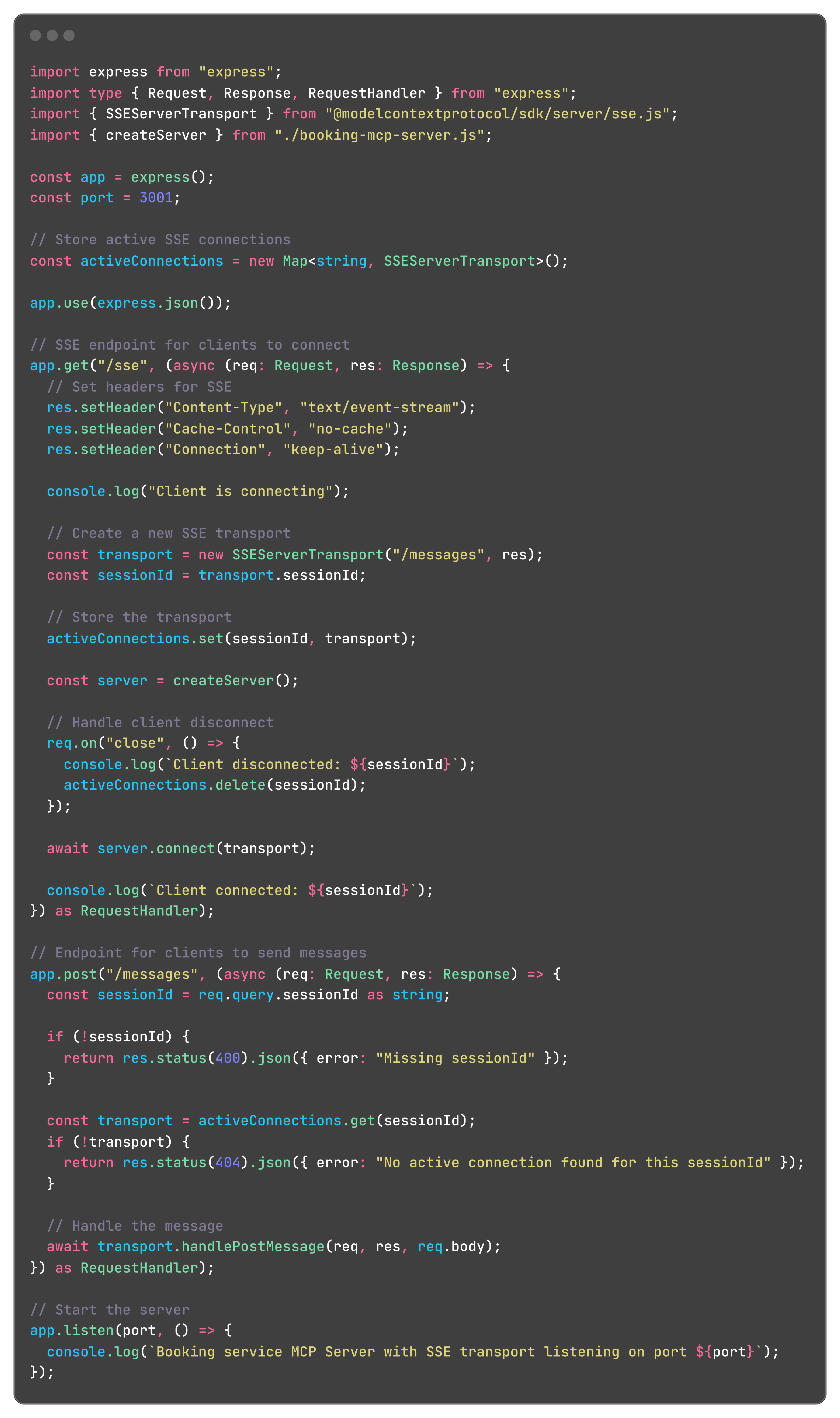
Utilizing Existing MCP Servers
We have created our MCP servers. Now, let’s explore how to call these servers in our application. Our application is a LangGraph AI agent (see the blog post on how to create an agent). We will use the MultiServerMCPClient from the langchain_mcp_adapters.client package. Here is an example of how to create a configuration for all MCP servers. Important disclaimer: choose either the STDIO or SSE protocol for a specific MCP server. If you are using the SSE protocol, remember to start the server. The STDIO protocol runs the server automatically.
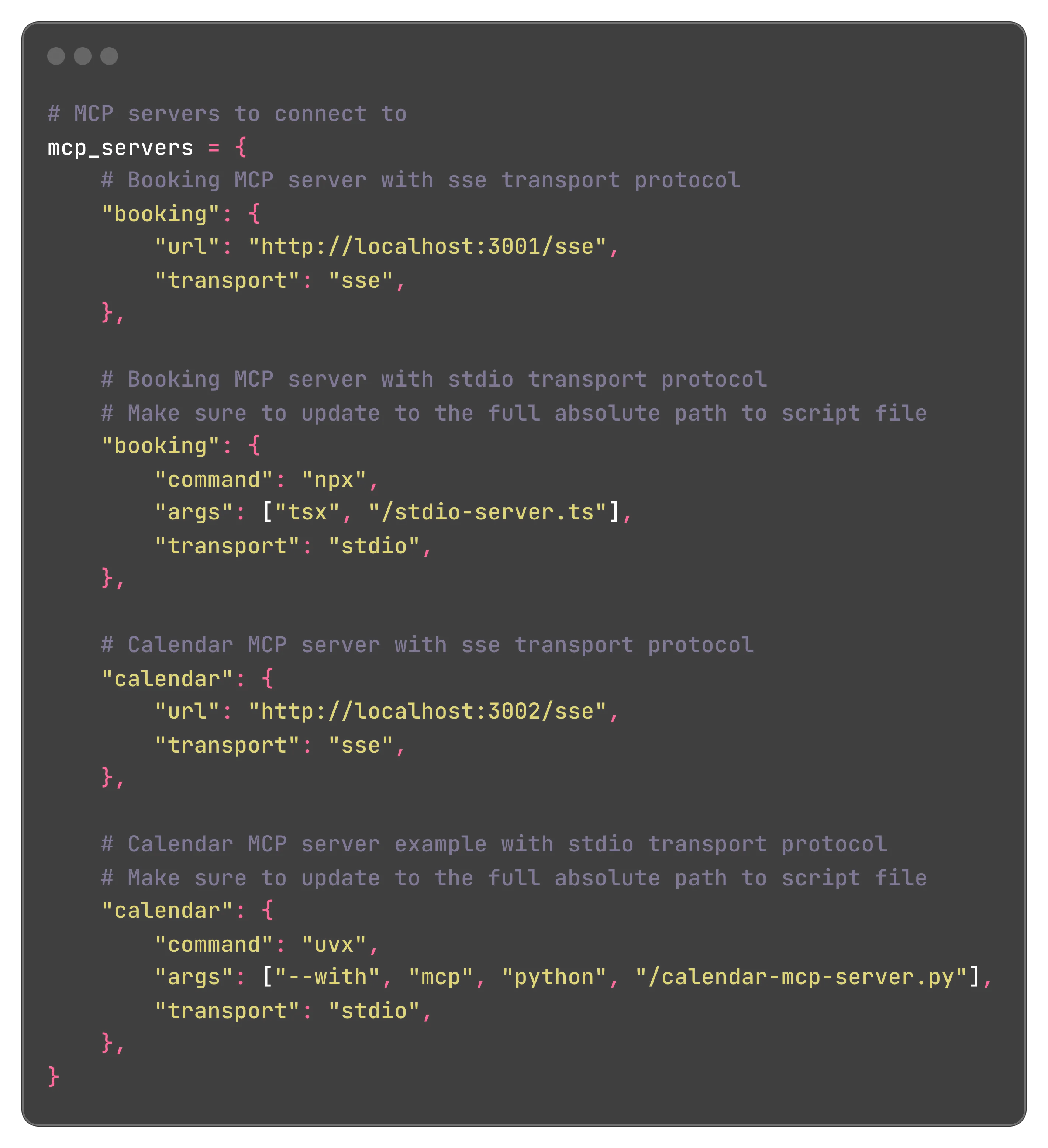
Next, we need to initialize the MCP client and retrieve all available tools from the servers.
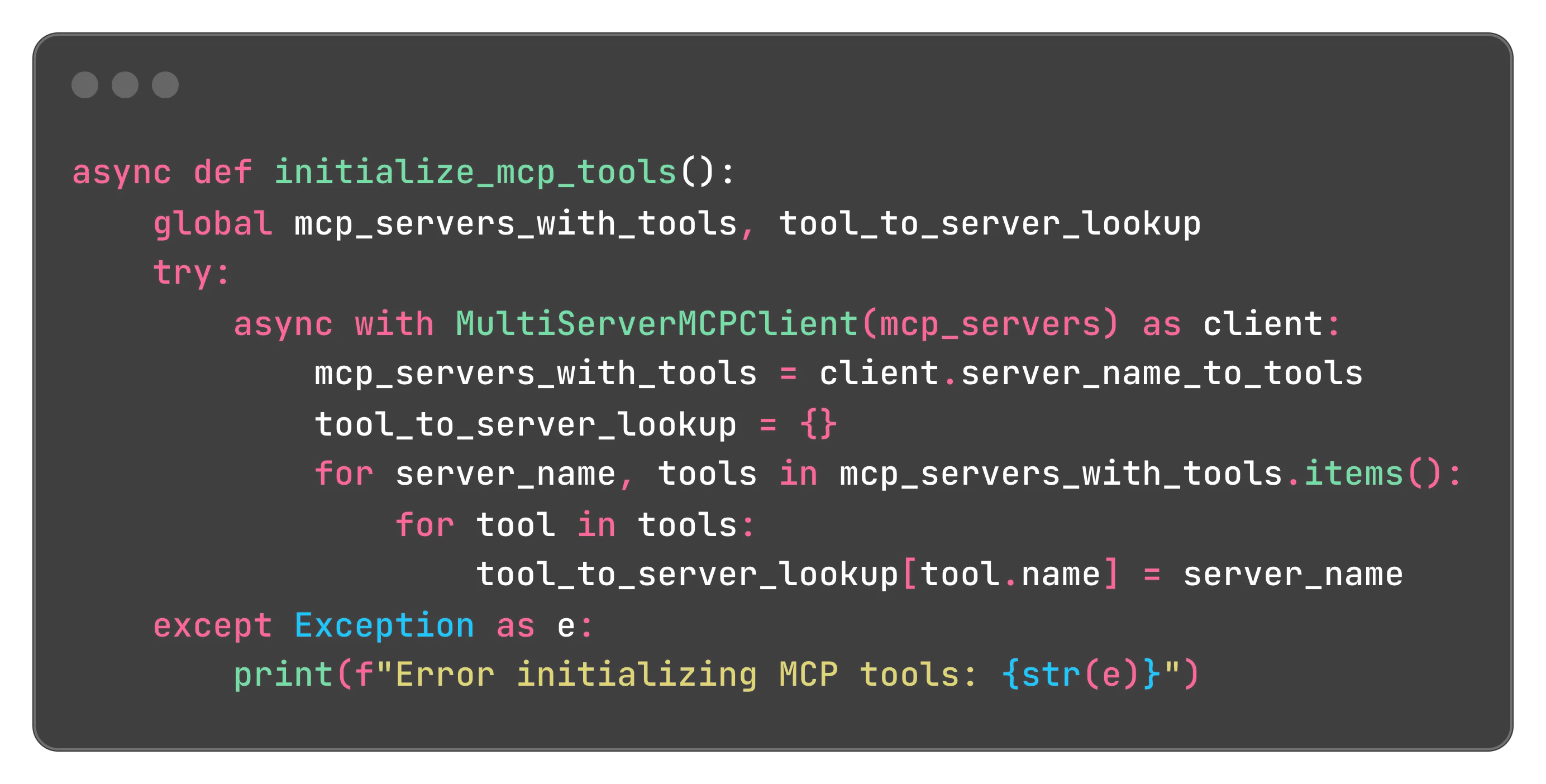
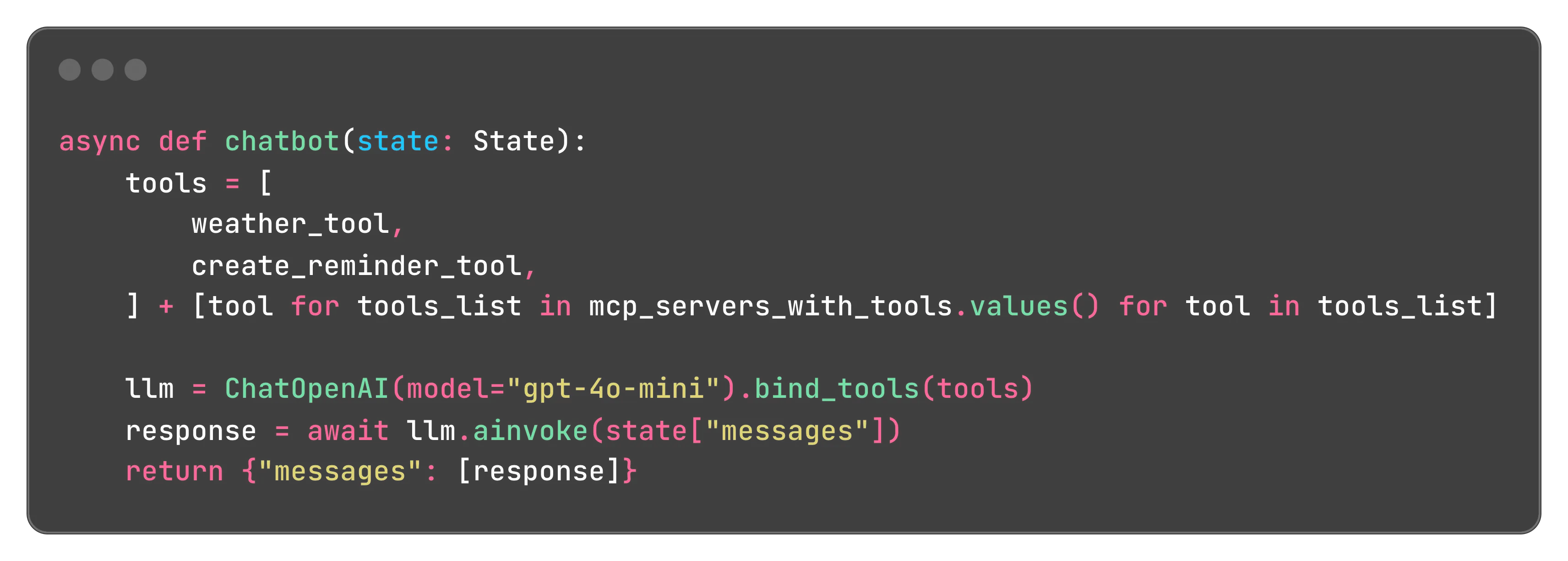
And that’s it. Now, when we make a request to an LLM, we provide the list of our tools.
Conclusion
The Model Context Protocol represents a significant advancement in AI integration technology, offering a standardized way to connect language models with the vast array of data sources and tools they need to provide truly valuable assistance. By solving the M×N integration problem and establishing common patterns for connecting AI with external systems, MCP reduces development overhead while making AI applications more capable, accurate, and useful.
As the protocol continues to mature and gain adoption, we can expect to see an expanding ecosystem of MCP servers and clients that further simplify the process of building AI-powered applications with rich contextual awareness. For developers and organizations looking to implement AI solutions, understanding and leveraging MCP will likely become an increasingly important part of the AI technology stack.
f you’re ready to start building with MCP, check out AI Cookbook on GitHub. It’s our open-source collection of real-world AI app examples using LangGraph and Next.js – complete with streaming, state handling, and human-in-the-loop flows. We built it to be simple, adaptable, and ready to plug into your own projects.
{{cta="/service-blocks"}}