



Today, cloud computing is no longer a luxury or an innovation. It has already become a necessity. Microsoft Azure at the moment is one of the leading cloud platforms, empowering businesses, developers, and IT professionals to build, deploy, and manage applications through global network of Microsoft data centers.
Azure works well for businesses of any size. Startups use it to scale fast, and bigger companies rely on it to bring old systems up to date. Teams can build new projects from the ground up or improve what they already have. It also integrates smoothly with different platforms and operating systems – a big win for developers who need that kind of flexibility.
In this article, we’ll walk through some of Azure’s key cloud services – from infrastructure (IaaS) and platforms (PaaS) to its built-in tools for AI, data analytics, and security. Therefore, if you are considering cloud migration or choosing among several cloud platforms for your new systems, this guide will be of great help.
What is Microsoft Azure?
To begin with, let us provide some basic information about Microsoft cloud services and explain what Azure Cloud is.
Microsoft Azure represents a cloud computing platform that allows companies to develop applications, empower data centers, or use it as their sole IT environment. The secret of its popularity lies within the platform's hybrid features and a powerful combination of services to build, deploy, and manage high-performance applications. That technological paradigm helps even small companies and startups to appear on equal footing with large corporations.
Microsoft Azure can be quickly scaled to meet various requirements, so the customers only pay for the platform's actual use. A per-minute reckoning for infrastructure services such as computing power, storage, and data movement speed in the data center guarantees the best price for the resources used. Nowadays, Microsoft Azure is used extensively in various domains such as:
- Big Data analytics;
- BI (Business intelligence);
- The development of web, mobile, and hybrid apps;
- Serverless computing;
- IoT services.
The platform relies on a growing global network of data centers managed by Microsoft. This approach enables clients to run high-performance applications targeted at users from around the world. Microsoft Azure supports numerous operating systems, languages, tools, and frameworks, from Windows to Linux and SQL Server to Oracle. The biggest benefits of Microsoft Azure services include:
- scalability;
- flexibility;
- reliability;
- data integrity;
- security.
The platform provides the best out of the Windows ecosystem and enables you to create apps and services that run on any device. In this article, we're going to find out what Azure is, so you can better understand its basics when deciding to adopt the platform.
What's the difference between Microsoft Azure and Microsoft 365?
Quite often, our customers ask us whether these two cloud products are not just the same (or what makes them different). They are both part of the Microsoft ecosystem. But they serve very different purposes and cater to different types of needs within an organization.
Azure is a cloud platform that lets you build, launch, and manage applications and services. Its core components are virtual machines, Azure databases, AI/ML, networking, storage, containers, IoT, hybrid cloud, and security tools.
Meanwhile, Microsoft 365 is a productivity and collaboration suite for end-users and teams. It unites office apps (Word, Excel, Outlook), Microsoft Teams, OneDrive, and others.
Given this, the Azure platform is targeted at developers, IT professionals, system architects, and DevOps teams. At the same time, Microsoft 365 is mainly used by business experts.
Microsoft Azure or AWS or Google Cloud?
Before we dive into Azure’s cloud services, there’s one big question to ask: which cloud platform is actually better – Amazon Web Services, Microsoft Azure, or Google Cloud?
Azure vs AWS
There's no definitive answer: both Amazon Web Services and Microsoft Azure are worth every dollar spent. In the majority of cases, the choice boils down to the specific requirements of a business. If you're looking for a reliable Platform-as-a-service (PaaS) provider, choose Azure. If Windows integration is a necessity, the answer is the same. On the other hand, AWS would be the preferred choice if a business needs a robust infrastructure-as-a-service (IaaS).
Both AWS and Azure have a large list of IaaS and PaaS offerings. However, it would be fair to say that choosing Azure would be wise for big players, while AWS is the choice for SMBs (especially US-based ones).
Microsoft Azure vs Google Cloud Platform
Both cloud providers stand out as powerful, enterprise-grade platforms offering a wide array of services. Azure stands out for how easily it connects with other Microsoft products like Windows Server, Active Directory, and Microsoft 365. For companies already using those tools, it’s often the obvious choice.
Google Cloud, on the other hand, is popular for its strengths in analytics, AI, and support for open-source tech. It’s designed with simplicity and developer productivity in mind, which makes it a favorite among startups, research teams, and digital-first companies.
When it comes to pricing, both are competitive and depend on what you’re building. Azure is often preferred by larger enterprises that need wide global coverage and hybrid deployment options.
Cloud experts at Akveo suggest basing your choice upon the following aspects:
- Current usage of the cloud computing resources;
- Availability of the needed services (mainly PaaS);
- Familiarity with the toolset;
- Vendor lock-in vs. open-source tech support;
- Pricing;
- Regulatory/industry compliance.
What types of cloud services exist?
Microsoft Azure includes three primary services: PaaS (Platform as a Service), SaaS (Software as a Service), and IaaS(Infrastructure as a Service).
Platform as a service (PaaS)
This service provides infrastructure and tools to develop your software from scratch. With PaaS, you don't have to care about hardware at all. Instead, you get everything you need to start creating your application right away, from programming language execution environments and databases to an operating system.
PaaS may be preferable for companies with an IT infrastructure in place. Sure, employees will have to configure the PaaS platform software themselves. Still, in return, the organization will have greater control over the development processes when delivering the finished software to customers.
Software as a service (SaaS)
With SaaS, you can access an application available to the general user audience on the Internet. The idea behind this service is easy: think Office 365, Gmail, Salesforce, or GoTo Meeting. In other words, an app is ready for work once you've logged in.
SaaS services work best for organizations that can't afford to buy on-premise solutions. Large companies often use this model for short-term projects that need to be quick, straightforward, and reliable.
Infrastructure as a service (IaaS)
This service offers an infrastructure to store data or deploy and run applications. With IaaS, the client can choose data storage, virtual servers, machines, operating systems, networks, and load balancers.
If you don't want to maintain your own on-premises data center, such a service is a perfect match for your business. IaaS services are a cost-effective alternative to buying equipment and creating local infrastructure. In simple terms, migrating to IaaS saves time and money in the long term.
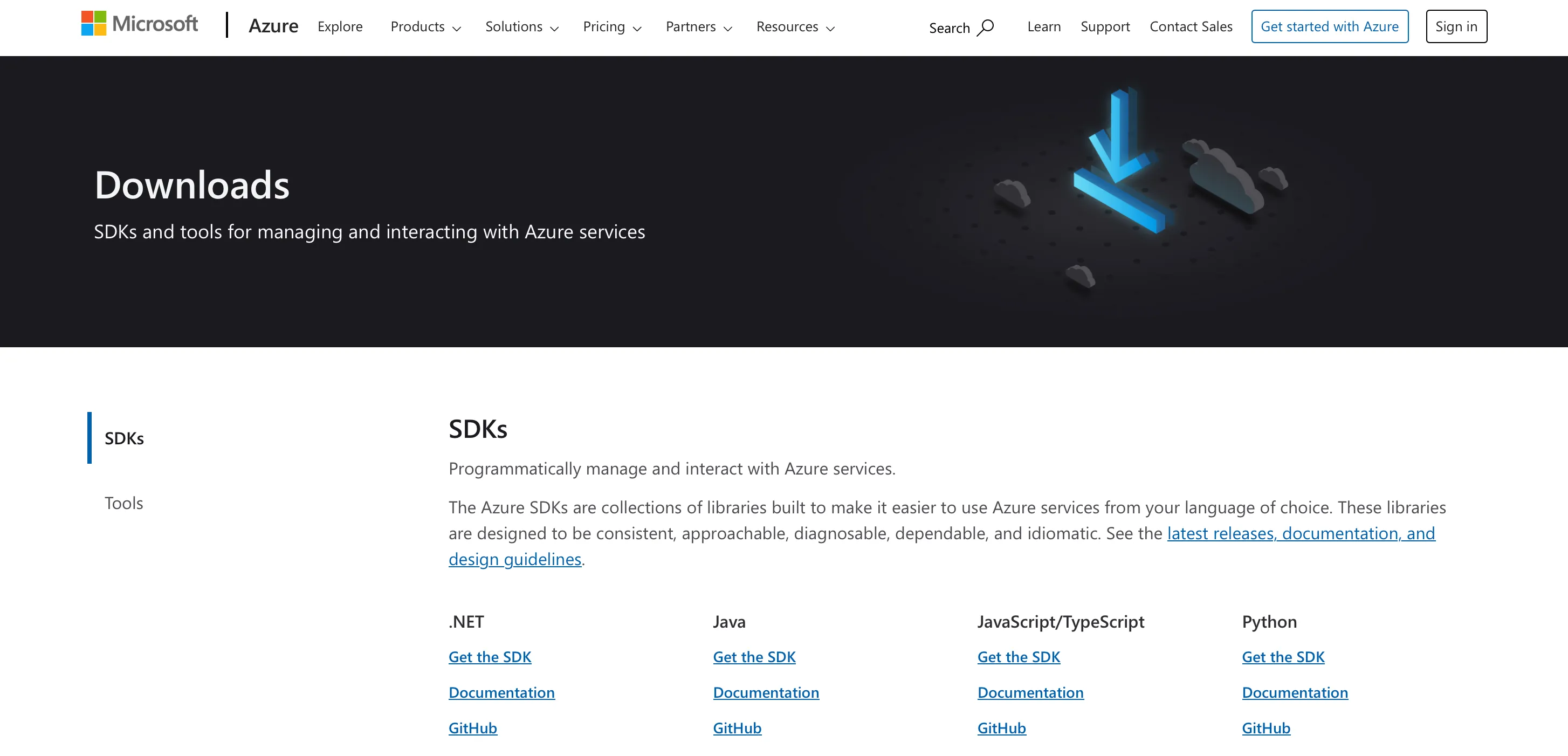
Azure also offers a wide range of SDKs and tools to help you manage and work with its services. Check out the whole list from the official website:
What products does Azure include?
It's worth saying that Microsoft has fully embraced the open-source movement. Using Azure HDInsight, it's possible to run open-source frameworks such as Apache Hadoop, Spark, Kubernetes (AKS), Hive, Kafka, etc.
The support of open-source tools allows businesses to avoid vendor lock-in solutions. This basically means that customers might migrate to/from Azure from other CSP/on-premise easier.
To supplement its services, Microsoft Azure comes with a rich product line that offers a solid base for web/mobile solutions, networking, computing, storage, databases, big data analytics, security, etc. Let's check some of these products in detail.
The platform provides tools for building, deploying, and testing both web and mobile applications. Plus, Microsoft Azure provides full support for APIs.
Azure web app service
It’s a fully managed platform designed to build, deploy, and scale web applications and RESTful APIs. It enables developers to create robust, secure, and scalable web apps. And what is highly important here is that they can do this without significant restrictions in the tech stack that can be chosen. They can rely on their preferred programming language and framework.
Key features of Azure App Service for web solutions:
- Multi-language support. You can build web apps using popular languages like .NET, Node.js, Java, Python, and PHP.
- Cross-platform hosting. Run your apps on either Windows or Linux – whichever fits your project best.
- Integrated deployment. Applications can be automatically deployed from GitHub, Azure DevOps (VSTS), Bitbucket, or even via FTP.
- Built-in scaling. Developers can automatically scale their web apps based on demand using Azure’s load balancing and auto-scaling features.
- High availability. SLA-backed uptime and deployment across multiple regions ensure global accessibility and reliability.
- Custom domains and SSL. Businesses can configure custom domain names and add SSL certificates easily to secure their applications.
- Staging environments. Development teams can use deployment slots to test changes in staging environments before pushing to production without downtime.
Azure mobile app service
Azure Mobile App Service extends the App Service platform to provide backend capabilities for mobile applications.
Key features:
- Cross-platform support. Developers create backends for native apps that run on various operating systems, including Android, iOS, and Windows. They can also create hybrid apps using Xamarin or Apache Cordova.
- Authentication and authorization. This developer tool enables simple integration with identity providers such as Azure Active Directory, Facebook, Google, Twitter, and Microsoft Account to secure your mobile solution.
- Offline sync. The platform offers built-in support for data synchronization and allows mobile applications to work offline and sync changes when reconnected.
- Push notifications. Mobile software products developed with this cloud computing service can send targeted push notifications to mobile devices using Azure Notification Hubs.
- Scalable API backend. Developers can create scalable APIs to handle app logic, user data, machine learning services, and more.
Azure storage service
As data is only growing globally, storage space is one of the most critical requirements for businesses of any size. Azure Storage Service provides storage options such as disk, file, blob, and queue, not to mention backup and recovery mechanisms. What's even more important is that all the user data stored using Azure Storage Service is secure and durable.
Database services
And what about database storage? Microsoft Azure allows storing large volumes of structured data using several types of database storage services.
For example, Azure SQL Database is a fully managed relational database built on Microsoft SQL Server. Azure SQL Database offers built-in intelligence, automatic performance tuning, and high availability out of the box. Organizations already familiar with SQL Server will find it easy to migrate and manage their databases in Azure with minimal reconfiguration.
Other database-as-a service options include:
- Azure database for MySQL;
- Azure database for PostgreSQL;
- Azure database for Maria DB;
- Table Storage;
- Azure Cosmos DB;
- Redis Cache.
Azure security
Undoubtedly, security is a vital concern for any business, especially in today's circumstances. Given this, various Azure services are intended for protecting the cloud environment and making cloud apps safer and more reliable.
Microsoft spends over $1 billion each year on cybersecurity, and Azure’s security tools benefit from that investment – offering enterprise-level protection powered by global threat intelligence.
Let's take a closer look at the key Azure security services.
Azure Active Directory (Azure AD)
- It provides Single Sign-On (SSO) and Multi-Factor Authentication (MFA) to ensure secure access to cloud applications and customer data.
- Azure Active Directory can protect users from 99.9% of common cyberattacks, including phishing and brute-force attempts.
- This Azure security cloud service can be seamlessly integrated with Microsoft 365, third-party apps, and custom enterprise applications.
Azure Key Vault
- This is an Azure security cloud service for storing secrets, encryption keys, API keys, certificates, and passwords.
- It offers role-based access control (RBAC) and works with Azure policies and logging tools to handle access management, auditing, and compliance.
- This service helps organizations meet industry standards such as ISO 27001, FIPS 140-2, and GDPR.
Azure Multi-Factor Authentication (MFA)
- MFA provides an additional step in verifying identity through methods like biometrics, one-time codes, or device-based checks.
- It strengthens security by lowering the chances of unauthorized access to critical systems, even if passwords are stolen.
- It can be enforced across all apps and services through conditional access policies.
Microsoft Defender for Cloud
- This cloud-native extended detection and response tool provides unified visibility and security posture management.
- It constantly monitors the security of your resources and provides clear, actionable recommendations.
- It protects users against threats to virtual machines, databases, storage, containers, and serverless functions.
Azure Security Center
- It provides a centralized dashboard for monitoring the security of all Azure workloads.
- Azure Security Center integrates threat detection, security recommendations, and automated remediation tools
- Azure Security Center also supports hybrid cloud environments for end-to-end security management.
Azure Functions
It is a serverless computing service that allows you to run small pieces of code without having to manage servers or infrastructure. It can automatically scale based on demand. But users of this public cloud platform need to pay only for the resources consumed during execution. This makes it an efficient and cost-effective way to build event-driven applications.
Main features and benefits of Azure Functions for businesses:
- Serverless architecture. Thanks to this, there is no need to provide or manage servers. Azure users can just write the code. The public cloud computing platform will deal with all the rest.
- Event-driven nature. Functions are triggered by events. The range of possible triggers includes HTTP requests, messages from queues, file uploads, timers, or database changes.
- Support for multiple programming languages. Developers can write functions in C#, JavaScript, Python, PowerShell, Java, or TypeScript.
- Scalability. Developer tools on the cloud platform can automatically scale out based on demand. Cloud resources can also be reduced to zero when not in use.
- Easy integration. This product can be seamlessly integrated with Azure services like Blob Storage, Event Grid, Azure Service Bus, and many others.
- Faster time to market. Developers have the possibility of creating small units of functionality quickly and deploying them independently.
Azure Stack
Azure Stack is a consistent hybrid cloud platform that enables organizations to run Azure services from their own data center or in edge locations. It extends Azure’s capabilities beyond Microsoft's cloud and brings greater cloud flexibility.
Azure Stack is not a single product. It is a family of technologies designed to help organizations build and run applications across environments.
The Azure Stack family includes:
1. Azure Stack Hub
It’s a fully integrated solution that combines infrastructure-as-a-service (IaaS) and platform-as-a-service (PaaS). Businesses can run Azure services entirely on their own premises – perfect for environments that are disconnected, highly regulated, or need low latency. It supports virtual machines, containers, Azure Resource Manager, and more.
2. Azure Stack HCI (Hyperconverged Infrastructure)
It is a virtualization host platform for running VMs and containers on Windows Server-based infrastructure. It is optimized for modernizing data centers using Azure Arc for hybrid management and Windows Server tools like Windows Admin Center for ease of use.
Windows Server in general and Azure Stack HCI in particular can become an excellent choice for businesses that are looking for high-performance, local computing with optional cloud integration.
3. Azure Stack Edge
It is a hardware-as-a-service device for edge computing. This device was designed to process data close to where it is generated. It supports offline mode and syncs with Azure when connected.
AI and ML services
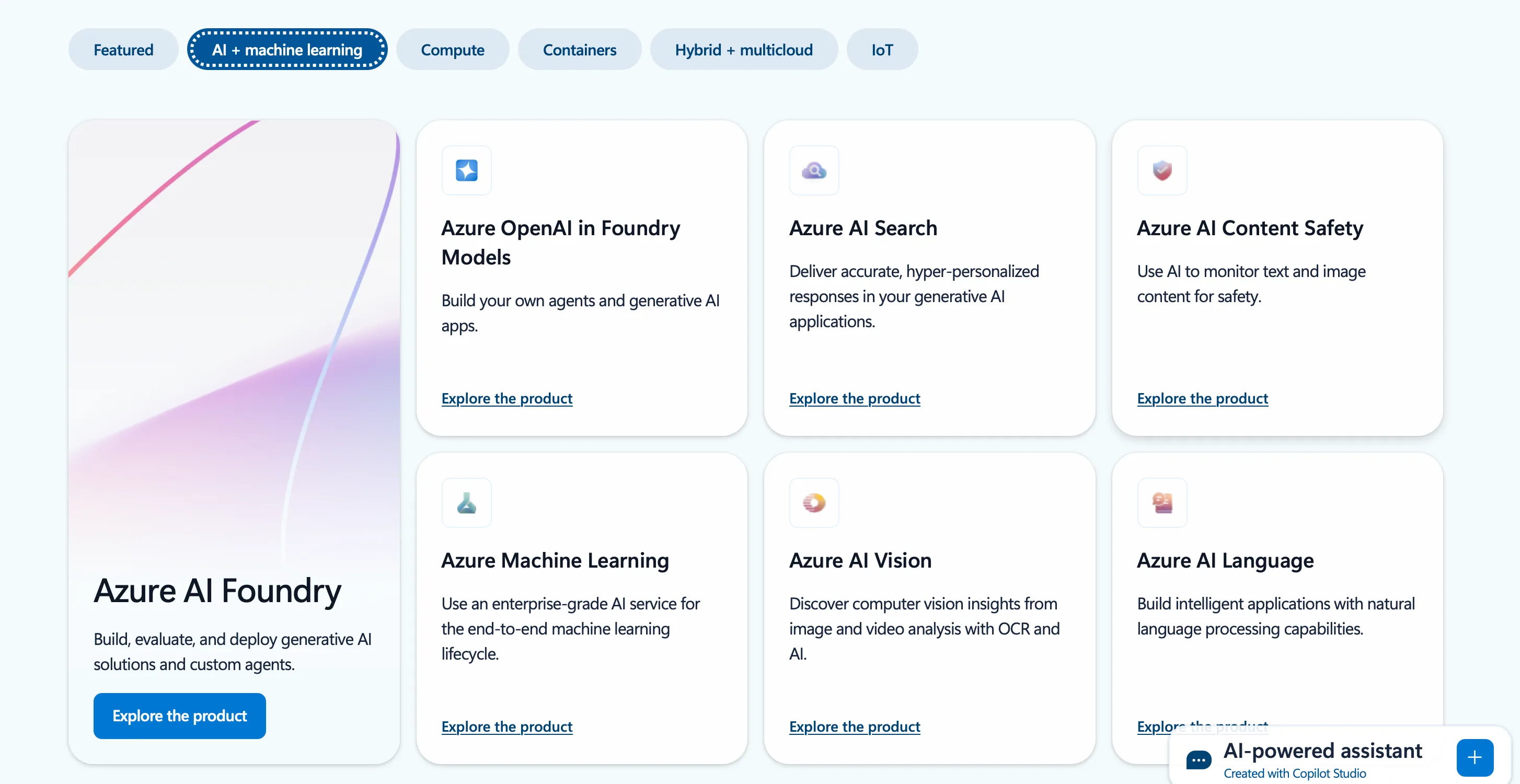
Microsoft Azure includes a wide range of AI and machine learning tools that help businesses make sense of their data and use it effectively. Teams can build, train, and launch AI-powered applications more easily, without dealing with unnecessary complications. Thanks to its capabilities, this public cloud platform can become an excellent choice for many groups of experts, including data scientists, software developers, and business analysts.
Azure Machine Learning
It is an end-to-end platform for building, training, and deploying ML models at scale. It supports both code-first experiences (Python, Jupyter, TensorFlow, PyTorch) and drag-and-drop tools via Azure ML Studio.
This service also includes MLOps capabilities for versioning, experiment tracking, and automated model deployment.
Azure cognitive services
It is a suite of pre-built AI APIs that bring human-like capabilities to apps.
It covers the following categories of services:
- Vision: Image recognition, facial analysis, object detection;
- Speech: Speech-to-text, text-to-speech, voice recognition;
- Language: Text analysis, translation, summarization;
- Decision: Personalization, anomaly detection.
Azure bot service
This is a platform that can be used to develop, test, deploy, and manage intelligent chatbots.
It supports seamless integration with channels like Microsoft Teams, Slack, Facebook Messenger, WhatsApp, and custom websites.
Moreover, it offers natural language processing via Azure’s Language Understanding (LUIS) and OpenAI’s GPT capabilities.
Azure OpenAI service
This provides access to OpenAI’s powerful language models (like GPT) through the Azure cloud.
The range of use cases includes content generation, summarization, customer support automation, semantic search, and more. Apart from this, it ensures enterprise-grade compliance, privacy, and security controls.
Azure Content Delivery Network (CDN)
Azure Content Delivery Network is a cloud-based content distribution service that helps to minimize the time it takes to load content. When someone requests content from your app, Azure CDN delivers it from the closest point-of-presence rather than the main server, reducing the load on your backend infrastructure.
This solution is particularly beneficial for websites, e-commerce platforms, and applications with global reach.
Azure Portal
The Azure Portal is the central web-based interface for managing and monitoring all Azure cloud platform services that a user or organization may have.
It helps developers, IT professionals, and administrators deploy, configure, and maintain Azure resources efficiently, without switching between confusing dashboards.
Azure Portal allows users to create and manage resources, monitor application health and usage, configure settings and security, manage billing and subscriptions, as well as access diagnostic tools and logs.
It also supports role-based access control. It enables organizations to assign permissions to team members based on their roles and execute efficient access management to ensure secure and efficient operations.
What is Azure Virtual Network (VNet)?
Speaking about what the platform can offer, it's worth mentioning Azure Virtual Network. It’s a dedicated, isolated section of the cloud where users can set up their own IP address ranges, subnets, route tables, and network gateways. It functions much like a traditional on-premises network. But at the same time, it ensures the scalability, availability, and isolation, which are typical for cloud computing services.
This virtual network allows organizations to create a secure environment for deploying apps and services and keep control over IP address blocks, DNS settings, security policies, and routing.
Each virtual network is completely isolated from other VNets in Azure. You can apply Network Security Groups and Azure Firewall to access management and/or restriction.
At the same time, the peering feature enables private communication between two VNets.
What is Microsoft Azure used for?
With a wide range of services and tools, Azure supports a diverse range of business needs across industries.
Web and mobile app hosting
Azure offers a flexible platform for hosting both web and mobile apps. With tools like Azure App Service and Azure Kubernetes Service (AKS), developers can get applications up and running quickly and scale them as traffic grows. It supports a variety of programming languages and frameworks, so teams can work with .NET, Java, Python, Node.js, and more.
Benefits of Azure services for this use case:
- Autoscaling and high availability;
- Integrated CI/CD tools for continuous deployment;
- Built-in monitoring and diagnostics.
Enterprise software deployment
Azure enables businesses to migrate and host enterprise-grade applications such as ERP, CRM, and other legacy systems. These applications benefit from Azure’s global infrastructure, high performance, and secure environment.
Benefits of the Azure cloud for enterprises:
- Reduced on-premises infrastructure costs;
- Increased performance and reliability;
- Simplified management with Azure’s identity and access tools.
Backup and disaster recovery
Azure offers reliable solutions like Azure Backup and Azure Site Recovery to protect critical data and ensure business continuity during various tech issues, including outages or cyberattacks. These tools automate backups, replicate data to secondary regions, and provide rapid recovery capabilities.
Benefits of the Azure public cloud for this use case:
- Cost-effective backup storage with long-term retention;
- Geo-redundant storage for disaster resilience;
- Centralized backup management.
Data analytics and Business intelligence
Services like Azure Synapse Analytics, Azure Data Factory, and Power BI let organizations gather, transform, and visualize data from multiple sources in real time. Azure supports big data workloads and integrates with tools like Apache Spark and Hadoop.
Benefits of Azure cloud for data analytics and BI:
- Scalable analytics infrastructure;
- Real-time dashboards and reports;
- Actionable insights from structured and unstructured data.
Machine learning and Artificial intelligence
Azure makes it easy for data scientists and developers to build, train, and deploy machine learning models. It can be done with tools like Machine Learning and Cognitive Services. These services provide APIs and pre-built models for speech recognition, image analysis, language translation, and more.
Benefits of this cloud computing platform for ML/AI projects:
- Drag-and-drop model building or full-code flexibility;
- Pre-trained AI models for fast integration into new and existing solutions;
- Scalable computing power for training and inference.
Internet of Things (IoT) applications
With the help of Azure IoT Hub and Azure Digital Twins, businesses can build connected solutions that collect, analyze, and act on data from IoT devices in real time. This use case is particularly advantageous for such domains as manufacturing, logistics, energy, and the smart building industries.
Benefits of Azure cloud services for IoT:
- Secure device-to-cloud communication;
- Real-time monitoring and control;
- Predictive maintenance and operational efficiency.
Key perks of Microsoft Azure for businesses
Now, after discussing the most highly demanding products of the Azure cloud platform and the most common use cases, let's focus on its advantages for companies and organizations of all types and sizes.
- Scalability on demand. Azure enables businesses to scale computing resources up or down instantly based on workload demands. It is highly helpful in many situations, whether you are running seasonal campaigns, processing large datasets, or managing daily operations. This cloud computing platform ensures optimal performance without overpaying for unused capacity.
- Enterprise-grade security. Security is baked into Azure’s DNA. With features like Azure Active Directory, Multi-Factor Authentication, Azure Security Center, Microsoft Defender for Cloud, and Azure Key Vault, businesses benefit from comprehensive protection against cyber threats.
- Global reach and reliability. Azure operates in over 60+ cloud regions, making it one of the most globally available platforms. This allows businesses to deploy applications closer to users in different corners of the world for reduced latency to meet local data residency and compliance requirements.
- Azure hybrid benefits. Unlike many cloud providers, Azure excels in hybrid cloud scenarios. With the key Azure hybrid benefit, companies can manage resources across on-premises, multi-cloud, and edge environments. This ensures unmatched flexibility for complex IT infrastructures.
- Built-in AI and ML. Azure democratizes AI with products like Cognitive Services, Azure OpenAI Service, and others. Businesses can build smart applications, automate tasks, analyze customer behavior, and generate insights without building models from scratch.
- Streamlined DevOps and automation. Azure integrates deeply with GitHub, Azure DevOps, and other CI/CD tools. This makes it easier for development teams to automate testing, deployment, and monitoring. All this leads to faster release cycles and fewer errors.
- Cost efficiency and flexible Azure pricing. With pay-as-you-go models, reserved instances, and cost-management tools, the platform helps businesses optimize spending on Azure resources while scaling effectively. Built-in budgeting and forecasting tools make financial planning simpler and more transparent.
- Rich ecosystem and support. Azure supports a wide variety of cloud services, frameworks, languages, and third-party tools. It also offers extensive documentation, training, and a global partner network to help businesses onboard quickly and troubleshoot efficiently.
Azure pricing: key facts to know
Microsoft Azure offers a flexible and comprehensive pricing model designed to accommodate businesses of all sizes.
The pricing structure is based on a pay-as-you-go model, allowing organizations to pay only for the Azure resources they consume. Apart from standard pricing, businesses can also benefit from different options for cost optimization.
For instance, for predictable workloads, Azure offers businesses significant discounts that can be over 70%. This option is for those customers who commit to one- or three-year terms for services like Virtual Machines, Azure SQL Database (on the SQL server), and Azure Cosmos DB.
Microsoft also provides various cost management plans for those companies that are interested in the optimization of their expenses.
On the cloud computing platform's official website, you can find a convenient calculator. This tool enables users to estimate costs for various Azure products by configuring parameters such as region, instance type, and usage duration. It supports detailed cost breakdowns to promote transparency for informed budgeting decisions.
Microsoft Azure consulting: What is it?
So, why does one need to resort to Microsoft Azure consulting? The answer is rather simple: such services help companies proceed with successful Azure migration and carry out reliable cloud-native development and environment optimization.
Usually, Azure consultants start with pre-assessment and strategic planning to move further to Azure deployment itself. Overall, with Microsoft Azure consulting services, it gets a lot easier to accelerate the digital transformation for a business of any size.
Here's what businesses typically can get when they turn to professional consulting services:
Strategic planning and cloud readiness assessment. If you haven't used Azure before, consultants will evaluate your current IT landscape and identify the best way to organize your transition to cloud services. This assessment typically includes risk analysis, resource planning, and aligning Azure capabilities with ongoing business goals.
Seamless migration to Azure. It doesn't matter whether you want to move your systems, apps, workloads, and data from on-premises servers or other clouds, consultants ensure a smooth and secure migration to Azure with minimal disruption.
Cloud-native development. Azure experts can help businesses build scalable, resilient applications using Azure-native tools like Azure Kubernetes Service, Logic Apps, and other available options.
Environment optimization and cost management. Consultants can continuously monitor and fine-tune Azure environments to improve performance, ensure compliance, and reduce unnecessary expenses through optimization strategies.
Security and governance. Consultants help organizations understand what Azure security products offer, implement best practices, configure identity and access management, and guide businesses through governance policies.
How can Akveo help with Azure consulting?
Here at Akveo, we help businesses across business domains renovate their infrastructure, operational processes, and business applications. Our Microsoft Azure consulting services include everything you need to take towards a successful and cost-effective Microsoft Azure migration, as well as the smart use of Azure resources and cloud services.
From a step-by-step strategic plan to implementation and further maintenance, we're here to support your digital transformation. The team of industry-leading Microsoft Azure consultants will convert your vision into reality.
Our certified Azure experts can help you create and maintain a secure, scalable, and easy-to-manage cloud infrastructure. It's possible to hire our experts on a full-time, part-time, or temp-to-hire basis. Contact us today to discuss your project.
Summary
Over the last years, many industry professionals have seen the rise of cloud computing as "unprecedented." In 2025, the global cloud service market is expected to reach a volume of $721.87 billion. By 2034, it is expected to be close to $2,726.94 billion. It means that the market is growing at a CAGR of 16.00% from 2025 to 2034.
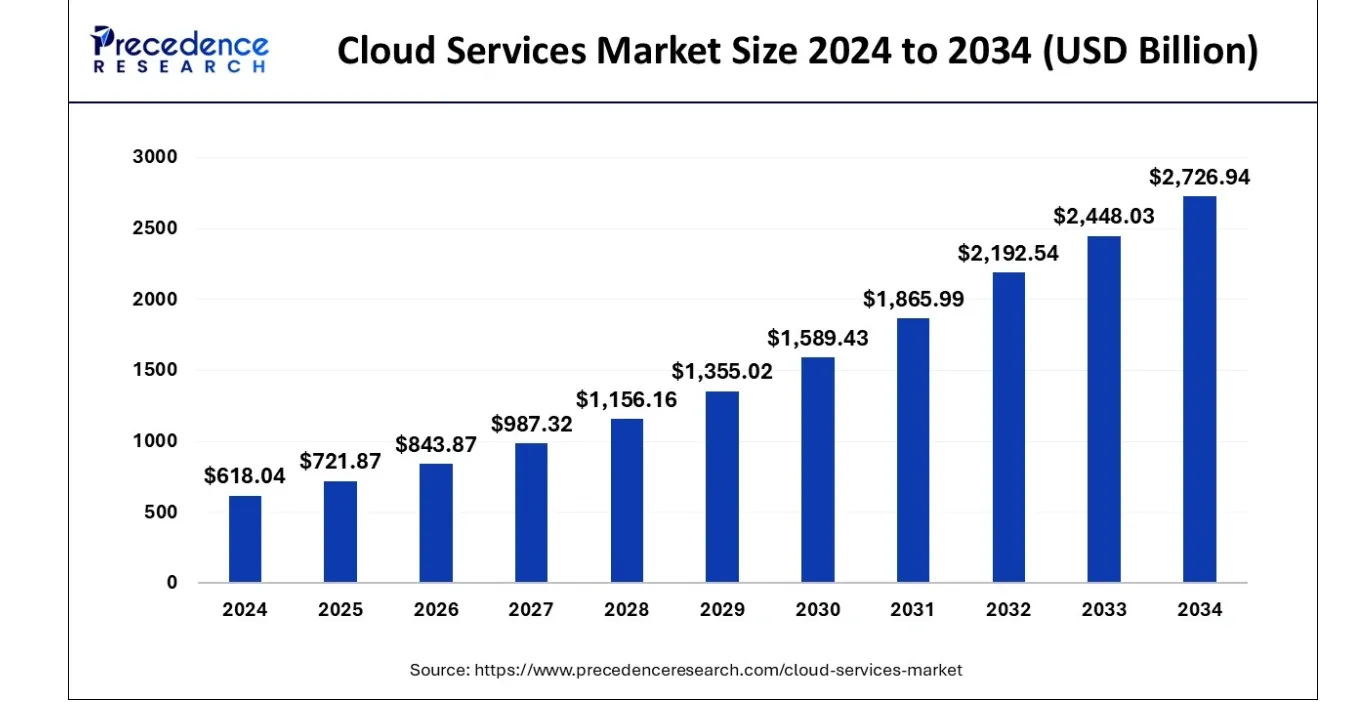
According to Gartner, end-user public cloud spendings are forecasted to increase by more than 21% globally in 2025 from $595.7 billion in 2024 to $723.4 billion.
In an era defined by digital acceleration, Microsoft Azure stands out as a critical enabler of innovation, agility, and resilience. With all its products and services, it is a go-to platform for businesses of all sizes and industries.
As cloud adoption continues to surge, investing in Azure can become a strategic move toward future-proofing your business in an increasingly competitive and data-driven world.
Our certified team of Microsoft Azure consultants, solution architects, and engineers will help you get the best out of Azure migration consulting, development, and optimization. Share your requirements and needs with us and let us guide you throughout your journey towards digital transformation today.
{{cta="/service-blocks"}}