


iOS or Android development? This choice isn’t just about technology; it's about strategy. Understanding when to choose iOS and when to go for Android can shape the success of your app and business.
Whether you’re a startup with a groundbreaking idea or a seasoned app developer facing platform-specific challenges, grasping the core differences between the iOS and Android ecosystems will simplify your decision-making process. That’s why we’ve crafted this comprehensive guide to help you navigate the key differences between these mobile platforms and make an informed decision.
Buckle up, as it’s time to settle the iOS vs Android debate once and for all! But first, a quick look at mobile development in general.
Overview of mobile app development
What is mobile app development?
Mobile app development is the process of creating software applications for mobile devices like smartphones and tablets. It involves designing, building, testing, and deploying apps for platforms like Android and iOS.
iOS developers use Swift programming language to create mobile apps that work seamlessly across different Apple devices and screen sizes. In contrast, Android developers use Java and Kotlin to build Android apps.
The mobile landscape is dominated by these two major operating systems. According to Statista, in the first quarter of 2025, Android continued to lead as the dominant mobile operating system globally, holding a market share of around 71.88%. Meanwhile, its closest competitor, Apple's iOS, accounted for roughly 27.65% of the market during the same period.
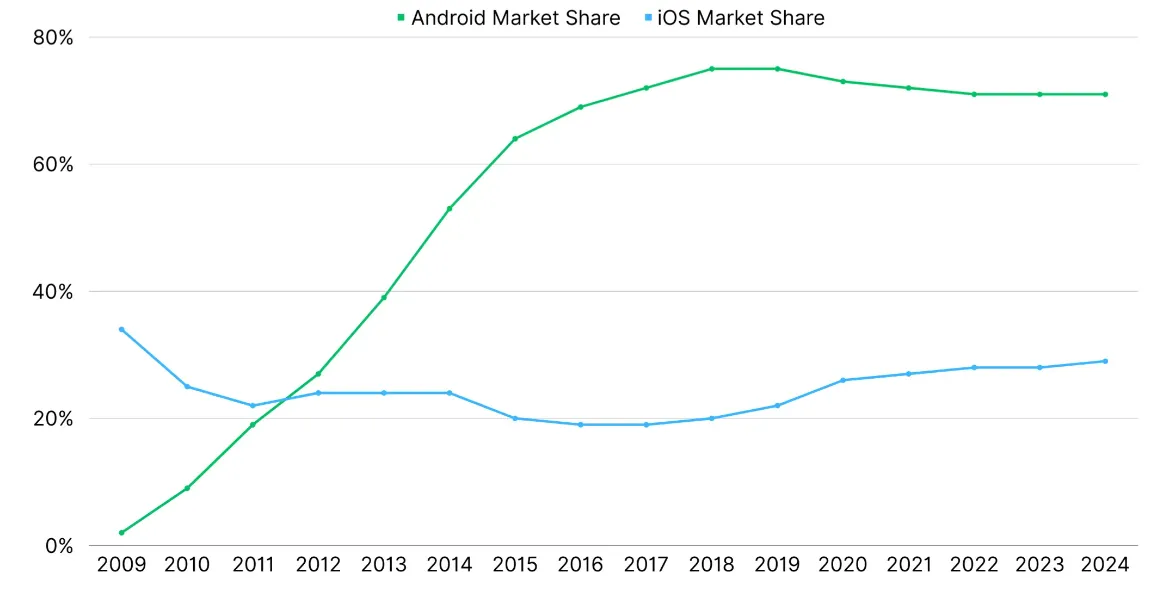
Although iOS has a smaller market share, its users tend to be more affluent and spend more on apps, making it an attractive platform for certain types of apps.
By the way, the first mobile app was developed in 1993 for the IBM Simon Personal Communicator. However, it was the launch of Apple's App Store in 2008 and Google Play in 2009 that truly transformed the app market. Since then, millions of Android and iOS apps have been created and made available for download, shaping the mobile landscape into what it is today.
iOS and Android app development: a side-by-side comparison
When it comes to building mobile applications, choosing between Android and iOS is probably one of the most important decisions you'll face. Each platform has its own strengths, tools, and user base.
In this chapter, we’ll pit iOS and Android app development against each other, revealing the key differences to help you make the smartest choice for your project.
Android vs iOS app: development environment and tools
Programming languages
As mentioned above, iOS apps are primarily built with Swift, Apple’s fast and user-friendly language designed specifically for its devices. On the Android side, Java and Kotlin programming languages are commonly used, with Kotlin gaining popularity due to its cleaner syntax and added features, though both are more complex than Swift.
For those looking to target both platforms, cross-platform development frameworks such as Flutter, React Native,Cordova, and Xamarin enable developers to build quality apps for both Android and iOS. However, this can come with performance trade-offs.
Just in case you're wondering, we'll cover cross-platform engineering and its pros and cons below.
Integrated development environments (IDEs)
For Android development, Android Studio is the official IDE. It’s built around the Gradle Build System, offering Android app developers a robust toolset for managing dependencies, building projects, and automating tasks. Android Studio also provides a comprehensive suite of tools, including a code editor, debugger, and project manager, making it an all-in-one solution for Android app development.
On the flip side, Xcode is the IDE for iOS development. It integrates seamlessly with Apple’s ecosystem and features Interface Builder, which allows developers to design user interfaces visually, simplifying the layout process. Xcode also includes essential tools like a code editor, debugger, and performance analyzer, making it a powerful choice for creating apps for iPhones, iPads, and other Apple devices.
App design and user experience
Designing for Android and iOS requires understanding the unique philosophies and technical specifics of each platform. From visual layouts to navigation patterns and widget behavior, each system presents its own approach to user experience.
Design philosophy:
- iOS: Prioritizes minimalism, elegance, and consistency. Apple’s Human Interface Guidelines encourage clean layouts, simple color schemes, and intuitive navigation. Besides, iOS apps tend to have more consistent quality and user experience due to standardization across devices.
- Android: Offers flexibility and customization through Material Design. Developers can experiment more with layouts, components, and animations to build unique interfaces.
Navigation bar placement:
- iOS: The navigation bar is centered and typically used to display the screen title. Managed via UINavigationBar, it aligns with Apple’s polished, symmetrical design approach.
- Android: The navigation bar is left-aligned and often includes a hamburger menu or action buttons. Implemented through Toolbar or ActionBar, allowing for more versatility in screen structure.
Navigation patterns:
- iOS: Focuses on gesture-based, intuitive navigation, with clear hierarchies and seamless transitions between screens.
- Android: Supports more layered navigation, often combining drawers, tabs, and floating action buttons for deeper control.
Widget support:
- iOS: Widgets are more limited and static, placed in the Today View or Home screen with restricted interactivity.
- Android: Widgets are highly dynamic, resizable, and can be freely placed on the home screen, offering enhanced engagement and real-time updates.

Development complexity and time
Android development tends to be more complex and time-consuming. Due to device fragmentation, developers must account for a wide range of screen sizes, densities, hardware specs, and OS versions. This requires extensive testing and optimization, which increases both development time and budget.
iOS development is generally faster and more cost-effective. Apple’s limited device range and closed ecosystem allow for more predictable performance and easier testing. Besides, iOS development tools like Xcode are generally considered more refined, making design simpler for developers.
Cost of development and ROI
Cost of creating apps for iOS
iOS app development typically comes with higher upfront costs, but it can deliver a strong return on investment (ROI), especially when targeting users who are more willing to spend. This is largely due to the demographic and purchasing behavior of iOS users, who tend to have higher disposable incomes and show a greater willingness to pay for premium apps and services.
Thus, the average annual salary of iOS users is around $53,000, while Android users average around $37,000. iOS users, on average, spend $101 per month on technology products, while Android users spend only $51.
From a developer’s perspective, the cost of iOS app development is influenced by Apple's annual developer account fee, which is higher than Google's one-time fee. Apple charges $99 per year for access to its developer tools and distribution platform, whereas Google charges a one-time $25 fee.
While the upfront investment may be higher, the uniformity of Apple devices and polished tools like Xcode simplify testing and development – often making iOS apps quicker and more efficient to build compared to Android.
Interesting fact: Men are more likely to use Android devices, and women are more likely to use Apple devices, as per the source.
Cost of creating apps for Android
Overall costs for Android development tend to be higher due to the need for extensive testing across various devices. With hundreds of manufacturers and screen sizes, device fragmentation remains a major challenge, often increasing both the complexity and duration of development projects.
This fragmentation means apps must be optimized for different resolutions, OS versions, and hardware capabilities, which demands more time, resources, and QA efforts. As a result, Android applications may take longer to create and are therefore costlier compared to iOS.
While Google’s one-time developer fee is lower than Apple’s, the hidden costs of supporting a broad ecosystem, like extra development hours and extended testing cycles, can quickly add up.
In contrast, iOS development costs may be affected by the need for an Apple developer account, but its more standardized environment often helps reduce time and cost in the long run.
Return on investment (ROI) and revenue per platform
iOS apps tend to deliver a higher return on investment, thanks to a user base that is more likely to spend on premium apps, in-app purchases, and subscriptions. Monetization strategies on iOS often lean toward direct revenue models rather than ads, which typically generate less income. Despite having fewer overall downloads, the Apple App Store consistently outperforms Google Play in terms of revenue. This makes iOS especially appealing for businesses aiming to generate profit directly through their apps.
So, while Android dominates in total app downloads and global market share, its ROI is generally lower than iOS. A significant portion of Android apps rely on ad-based monetization, which tends to yield lower revenue compared to paid apps or subscriptions.
Therefore, Android is often the better choice for maximizing reach, while iOS remains stronger for generating revenue per user.
Monetization strategies and in-app purchases
As mentioned earlier, iOS apps often generate more revenue through in-app purchases and subscriptions, which are popular among its high-spending user base. Apple supports various monetization models and takes a 15% commission on subscriptions after the first year. Since iOS users are more willing to pay for premium features, developers tend to rely less on ad-based revenue, contributing to a higher overall ROI.
Android supports similar monetization options, including in-app purchases, subscriptions, and ads. While Android apps also apply a 15% subscription fee, ad-based models are more common, especially for apps targeting wider audiences.
App store and distribution
Google Play Market vs App Store
The approval process for iOS apps is more rigorous than for Android apps, which can be approved more quickly. This is largely due to Apple’s complex moderation system, which not only enforces stricter guidelines but also ensures a higher level of security and app quality.
As a result, the App Store is considered a safer source of apps, and iOS users face fewer malware risks compared to Android.
Android app distribution allows developers to reach a wider audience as it can be hosted on multiple platforms beyond just Google Play. While this flexibility benefits reach, it can also introduce more security vulnerabilities.
Security and privacy
Data protection and encryption
Apple offers strong built-in encryption tools to secure user data both in transit and at rest. Its tightly controlled environment, secure storage frameworks like Keychain and Secure Enclave, and focus on secure authentication make data protection easier for developers.
Android also supports encryption, but its open-source nature and device variety require more developer involvement. Developers must manually implement secure data storage and authentication mechanisms, and test them across various devices and OS versions, which adds complexity.
Compliance with regulations and standards
Apple enforces strict compliance with privacy regulations like GDPR and HIPAA through its App Store review process. Developers are expected to follow these standards closely, and Apple’s clear documentation helps guide them through the technical requirements. The platform’s structured ecosystem and consistent updates make maintaining compliance easier over time.
While Google offers guidance for regulatory compliance, Android places more responsibility on developers to ensure that their apps meet standards such as GDPR or HIPAA. Due to the fragmented nature of Android devices and versions, staying compliant requires a deeper understanding of regional regulations, careful implementation, and regular auditing. It's advisable to consult with legal or compliance experts to avoid risks.
Cross-platform development: one app for multiple platforms
Cross-platform development is a method of building mobile applications that run on both iOS and Android using a single codebase. Instead of writing separate native apps for each platform, developers can use cross-platform development tools like Flutter, React Native, or Xamarin to streamline the process.
Feel free to read this guide to compare React Native and Flutter. Or this guide to compare NativeScript and React Native in the world of cross-platform development.
Cross-platform development solutions have emerged as a popular software development trend for building mobile apps for both Android and iOS. This approach is particularly appealing to teams looking to reduce time, cost, and maintenance efforts while still reaching a broad user base across different devices and operating systems.
Interesting fact: Larger companies often prefer to build native applications for better performance, while smaller companies may opt for cross-platform app development to save costs.
Cross-platform development: pros and cons
Pros:
1) Cross-platform mobile development allows you to maintain a single codebase, saving time and resources compared to developing separate native apps.
2) Choosing cross-platform development can be especially beneficial during the prototyping and testing phases of app development.
3) Developing for both platforms allows you to reach a wider audience. However, it requires more resources and can be more complex.
Cons:
1) Cross-platform apps can result in a longer time to market due to the need to test across different operating systems for consistent behavior.
2) Cross-platform engineering can be a good option, but it may compromise on quality or speed.
3) Cross-platform apps may lack the same level of performance and customization as native apps, due to variations in how each platform handles behavior and processes.
iOS and Android development: choosing the right platform
When deciding between iOS or Android application development, it’s important to evaluate a variety of factors to ensure your app reaches its target audience effectively while staying within budget and meeting your goals. Both platforms have their strengths and limitations, and your choice ought to be based on several key considerations. Let's explore these factors in detail.
Factors to consider when choosing a platform:
1) Market share and user demographics
Android users are concentrated in developing regions worldwide, which means targeting these areas may require building for Android. iOS, on the other hand, tends to have a more affluent user base, especially in developed countries.
2) Development complexity and time
iOS development generally takes less time due to a more uniform device ecosystem and a more refined set of development tools.
In contrast, Android development often requires more resources because of the platform’s fragmentation: you need to consider a variety of screen sizes, OS versions, and hardware capabilities.
3) Cost of development and ROI
iOS development tends to be more cost-effective in the long run, given its streamlined environment and higher potential for revenue generation. However, the upfront cost for iOS, including Apple's developer account fee, may be higher.
On the other hand, Android app development, while reaching a broader audience, often requires more investment due to its fragmented nature and the need for extensive testing across various devices.
4) App store and distribution models
The App Store and Google Play have different approval processes and distribution models. iOS offers a more controlled ecosystem, which means apps are scrutinized more thoroughly, ensuring higher quality and security.
Android offers a more flexible and accessible distribution process, allowing apps to be hosted on multiple platforms beyond Google Play, though this can sometimes complicate the release and update process.
5) Post-launch challenges
Post-launch support for Android apps is more challenging due to the diversity of devices they need to support. Maintaining consistent performance across such a wide range of devices can be time-consuming and resource-heavy.
In contrast, iOS devices are more standardized, making ongoing support and updates more manageable.
6) Customization and scalability possibilities
Android's open-source nature allows for greater customization and deeper system-level functionality than iOS. If your app requires significant customization or needs to scale rapidly, Android may offer the flexibility needed to meet those requirements.
However, if you're aiming for a simpler, more controlled app ecosystem with high consistency, iOS might be a better fit for scalability.
7) You needs
It’s also essential to evaluate the specific needs of your app. For example, if you require heavy customization, deeper system integration, or a more flexible UI, Android’s open-source nature may be a better fit.
However, if you need a more polished, secure, and consistent user experience with a streamlined development process, iOS might be the best choice.
{{cta="/service-blocks"}}
Android vs. iOS app development: which one to choose?
Choose Android for wider reach and exposure, especially in developing regions. With its larger global market share, Android is ideal for targeting emerging markets and reaching a broad audience across various devices. Additionally, Android offers more flexibility and customization, allowing deeper system-level functionality and greater control over app features.
Choose iOS if your app targets affluent users in developed countries. iOS users have higher incomes and spend more on apps and in-app purchases, making it a lucrative choice for apps focusing on this demographic. iOS also offers a polished, sleek user experience and a simpler development process, as the limited device range makes testing easier and development more efficient.
Conclusion
Whether you’re leaning toward native Android or iOS apps, or exploring cross-platform app development, it's crucial to consider factors like development complexity, cost, and the user base.
iOS apps typically offer a more streamlined process and a more affluent audience, while Android devices provide broader reach, especially in developing regions. Nevertheless, your decision should align with your goals, budget, and timeline.
Need a fresh mobile app or looking to revamp your existing one? Whether you’re eyeing native Android and iOS apps or going cross-platform, Akveo’s mobile application development team is ready to turn your idea into a perfect app for your audience. See how we’ve already helped clients across different industries in our case studies.
Are you ready to craft something amazing together? Your next big mobile development project is just one click away – contact us to get your project kicked off.
{{cta="/service-blocks"}}