

Many buyers choose an LMS based on a simple, yet flawed metric: who has the longest list of features, or who has been in the market the longest.
When you evaluate the request for proposals from universities or corporate training departments, you really will find spreadsheets listing hundreds of requirements:
- Does it have a chat room?
- Does it support badges?
- Can it export to PDF?
Vendors respond to this by tacking on features. Over a decade, legacy learning management systems (LMS) have transformed into Frankenstein monoliths. They are massive, entangled codebases where the chat module is hard-coded into the user profile table. Meanwhile, the grading engine shares a database lock with the notification system. The result is technical debt. When a system tries to do everything, it does nothing well.
To avoid this, you need to identify the core 20% of LMS software features that drive 80% of your business logic (retention, completion, and certification) and cut the rest.
If you are a CTO, a VP of Engineering, or a founder managing a budget, this guide is your audit tool. We will dissect the technical requirements of a scalable learning management system, differentiating between features that generate revenue and features that generate maintenance tickets.
Must-Haves: LMS Software Features That Drive Revenue & Retention
In the software world, must-haves are often confused with basic functionality. However, from a revenue perspective, a must-have is a feature where failure results in user churn.
If a student has problems with logging in, you lose revenue. If the data is inaccurate, you lose credibility. These are the non-negotiables.
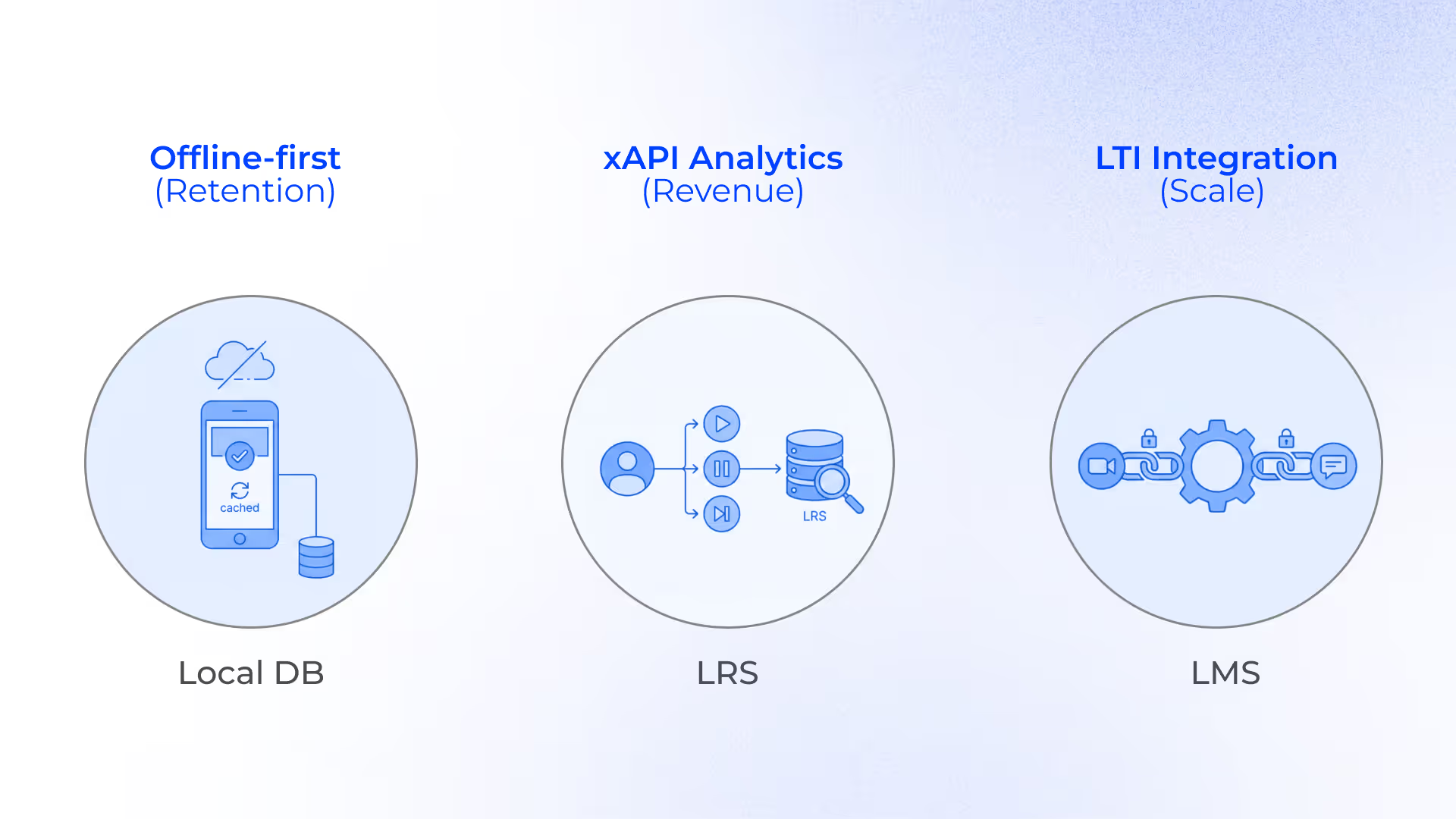
Mobile Experience: Offline-First Learning Management System
Most vendors claim they are mobile-ready. Usually, this means they have a responsive design (using CSS media queries) that shrinks the desktop site to fit a phone screen.
Why does this fail? Real-world learning often happens on the subway, on a flight, or in areas with poor 4G coverage. A responsive website requires a constant connection to the server. If the connection drops even for 5 seconds while a user is submitting a quiz, the packet is lost. The user sees a timeout error. They get frustrated, and they churn.
The key conclusion that you should make here: You do not need a responsive site. Instead, you need an offline-first architecture.
This is usually implemented via a progressive web app (PWA) or a native wrapper (React Native/Flutter) with a specific data synchronization strategy.
How can you introduce an offline-first approach?
Local storage layer. The LMS must utilize IndexedDB or SQLite on the client device. When a user logs in, the application fetches the relevant training course schema and caches it locally.
Service Workers. A JavaScript Service Worker acts as a network proxy. It intercepts network requests.
- Online. It fetches data from the API and updates the cache.
- Offline. It serves content directly from the cache. The user experiences zero latency, even in airplane mode.
Optimistic UI. An intuitive user interface should assume success. When a user clicks on the button Complete Lesson, the UI updates immediately. The data is queued in a local persistent storage.
Background sync and delta updates. When connectivity is restored, the Service Worker detects the network. It does not re-download the whole course. It sends a delta package (only the changes) to the server.
What happens if a student completes a course offline, but the admin changes the course content online? There are several conflict resolution strategies:
- Last-Write-Wins (LWW): Simple, but risky.
- Operational transformation (OT): Complex, used in tools like Google Docs.
- Business logic rule: For an LMS, the student's completion record usually takes precedence over content updates. The architecture must handle this merge logic silently without throwing a database error.
By enabling offline access, you unlock both synchronous and asynchronous learning. Metrics show that offline-capable apps see 2-3x higher engagement rates in emerging markets and mobile-heavy industries (like field sales training).
Learner Progress Analytics that Mean Something: xAPI and LRS
For twenty years, the industry standard was SCORM (Sharable Content Object Reference Model). SCORM is a JavaScript communication standard that lives in an iframe. It tells the LMS two things:
- Did the user open the file?
- Did the user pass/fail?
However, SCORM is a black box. It can’t tell you how the user learned. It can’t track informal learning (reading a blog, watching a YouTube video, attending a webinar, studying training materials from other online courses). From a business intelligence perspective, SCORM data is too low-fidelity to be useful.
To address these issues, you must demand xAPI (Experience API) or cmi5 compliance.
xAPI decouples the data from the learning management system (LMS). Instead of writing to a rigid SQL table (User_ID, Course_ID, Grade), the system generates statements that are sent to a Learning Record Store (LRS).
xAPI uses JSON objects following an Actor > Verb > Object syntax.
This approach has a tangible business value. As you are tracking verbs/actions (paused, skipped, rewinded, highlighted), you can run behavioral analytics.
Here’s what you can learn from such analytics:
- Churn prediction. If 80% of users skip the intro video, your training content is boring.
- Difficulty calibration. If users rewind the same 30-second clip 4 times, that concept is too difficult or poorly explained for effective training.
- External learning. xAPI can track activities outside the LMS. If a user reads a technical article on your corporate wiki, a script can send an xAPI statement to your LRS. This gives you a holistic view of employee development and helps better your team's learning needs and learning styles. Thanks to this, your training initiatives can become more result-oriented.
True Integration Capabilities of Modern LMS Platforms
On the EdTech map, an LMS can be viewed as an island. It is not the only system that you rely on. Your business may also use Salesforce (CRM), Zoom (conferencing), Slack (communication), and BambooHR (HRIS), as well as many different tools for administrative tasks.
The amateur approach to integration is building a bridge. You write a custom Python script that pulls a CSV from HRIS and uploads it to the LMS via SFTP every night.
However, it’s a road to nowhere. Here is why:
- Fragility. APIs change. If BambooHR changes a field name, your script breaks.
- Latency. Data is always 24 hours old.
- Security. Moving CSVs around is a massive PII (personally identifiable information) risk.
The adoption of LTI 1.3 (Learning Tools Interoperability) can be a good solution.
LTI 1.3 is built on OAuth 2.0 and OpenID Connect (OIDC). It creates a secure, standardized handshake between the LMS and the tool (like Slack or Microsoft Teams).
Instead of just linking to the homepage of a tool, LTI allows the LMS to launch a specific resource and pass context.
The LMS securely passes the roster to the tool. "Jane is a Student. Bob is an Instructor." The external tool configures itself automatically. No double-login is required in this case.
When Jane completes the quiz in the external tool, the tool makes an API call back to the LMS gradebook to inject the score.
This reduces administrative overhead to near zero. There is no manual data entry. There are no "I forgot my password for the video platform" tickets. It creates a standard-compliant ecosystem where the LMS acts as the Identity Provider (IdP) for the entire learning stack.
Advanced LMS Features: Nice-to-Haves vs. Money Pits
When managing a software budget, you must distinguish between features that add value and features that add complexity. The following features are often requested by marketing teams. But engineering teams hate them due to their high maintenance cost and low utility.
Let’s take a closer look at this functionality and analyze its real value for your business.
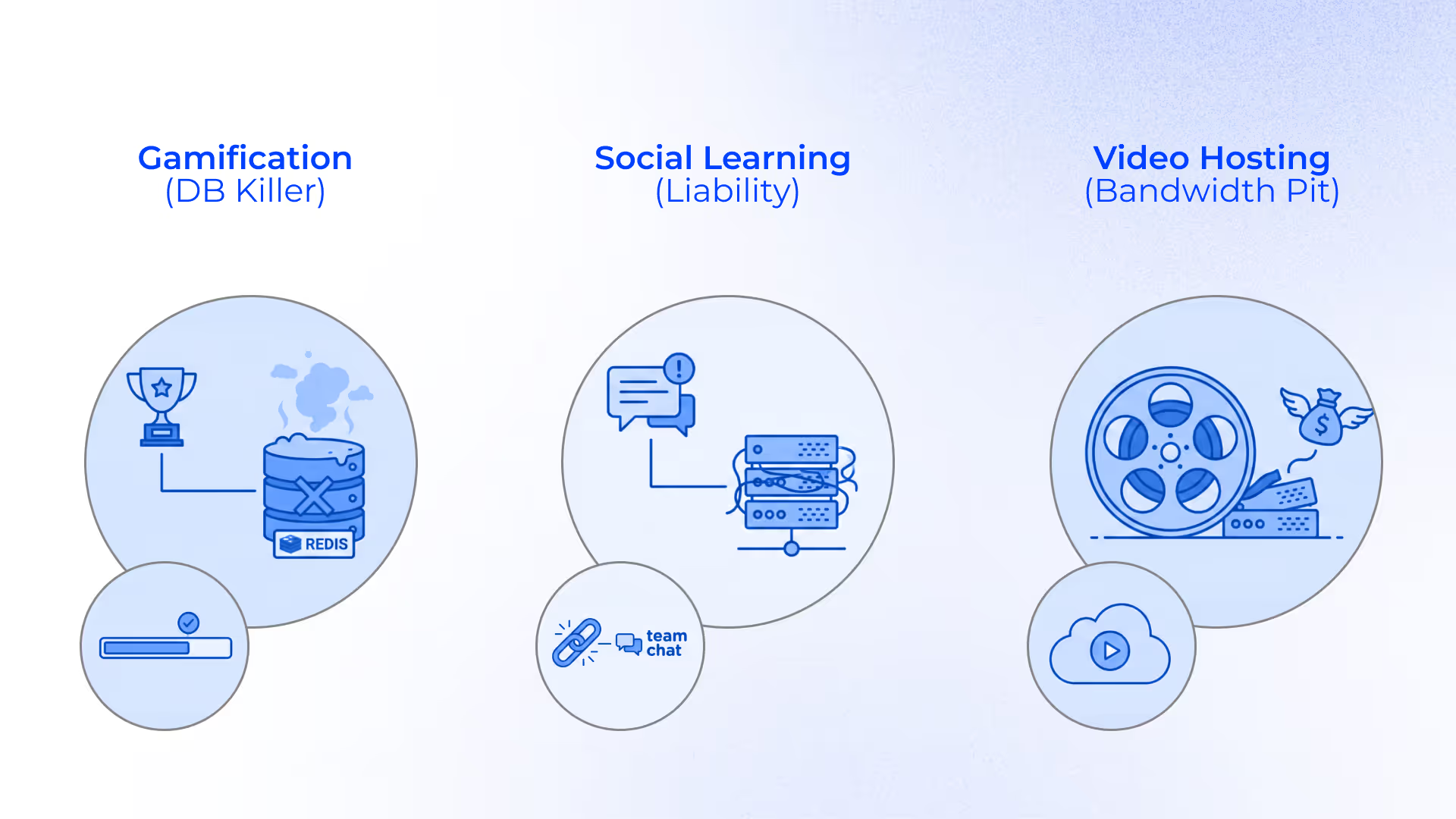
Gamification for Engaging Learning Process: Write-Heavy Database Killer
Gamification looks simple on the UI, but it is architecturally expensive. A global leaderboard requires calculating the rank of every user against every other user. If you have 50,000 users, and every time a person finishes a quiz, the system has to recalculate the leaderboard. As a result, you are creating a massive write-heavy load on your database.
If you must have it, it’s better to avoid calculating it in real-time SQL. Instead, you can opt for a high-performance in-memory data store like Redis.
Unless your business model is B2C (Business to Consumer), where learner engagement is the product, gamification is usually a distraction in B2B (Business to Business) contexts.
Focus on learner progress bars, not badges.
Social Learning: Moderation Liability
Building a chat application is not just about storing text. You need WebSocket infrastructure (Socket.io, Pusher) to ensure real-time message delivery. This requires a separate server cluster from your standard HTTP web server, as WebSockets keep connections open.
Moreover, an unmoderated forum is a legal risk. Harassment, spam, and misinformation require either human moderators (which is expensive) or AI moderation tools (that are technically complex).
Based on our experience in LMS development, we can recommend integrating special features instead of building them from scratch.
Your users are already familiar with Slack, Discord, or Microsoft Teams. Use the API to create a channel for the course on their existing platform. A subpar chat tool inside your learning management system will be redundant.
Video Hosting: Bandwidth Black Hole
Hosting video is the fastest way to crash your infrastructure and bankrupt your AWS budget.
A raw 4K video file from an iPhone is huge and incompatible with many browsers. You need a transcoding engine (like FFmpeg) to convert it into multiple resolutions (1080p, 720p, 480p).
Use a dedicated video API service like Mux, Vimeo API, or AWS Elemental MediaConvert. They handle the storage, encoding, and global delivery. Your LMS should simply store the ID of the video and embed the player.
Custom vs. Off-the-Shelf: How to Make the Right Choice
This is the most significant strategic decision you will make. Should you rent software (SaaS) or should you build a custom platform?
There is no right answer. However, there are strengths and weaknesses that you should stay aware of.
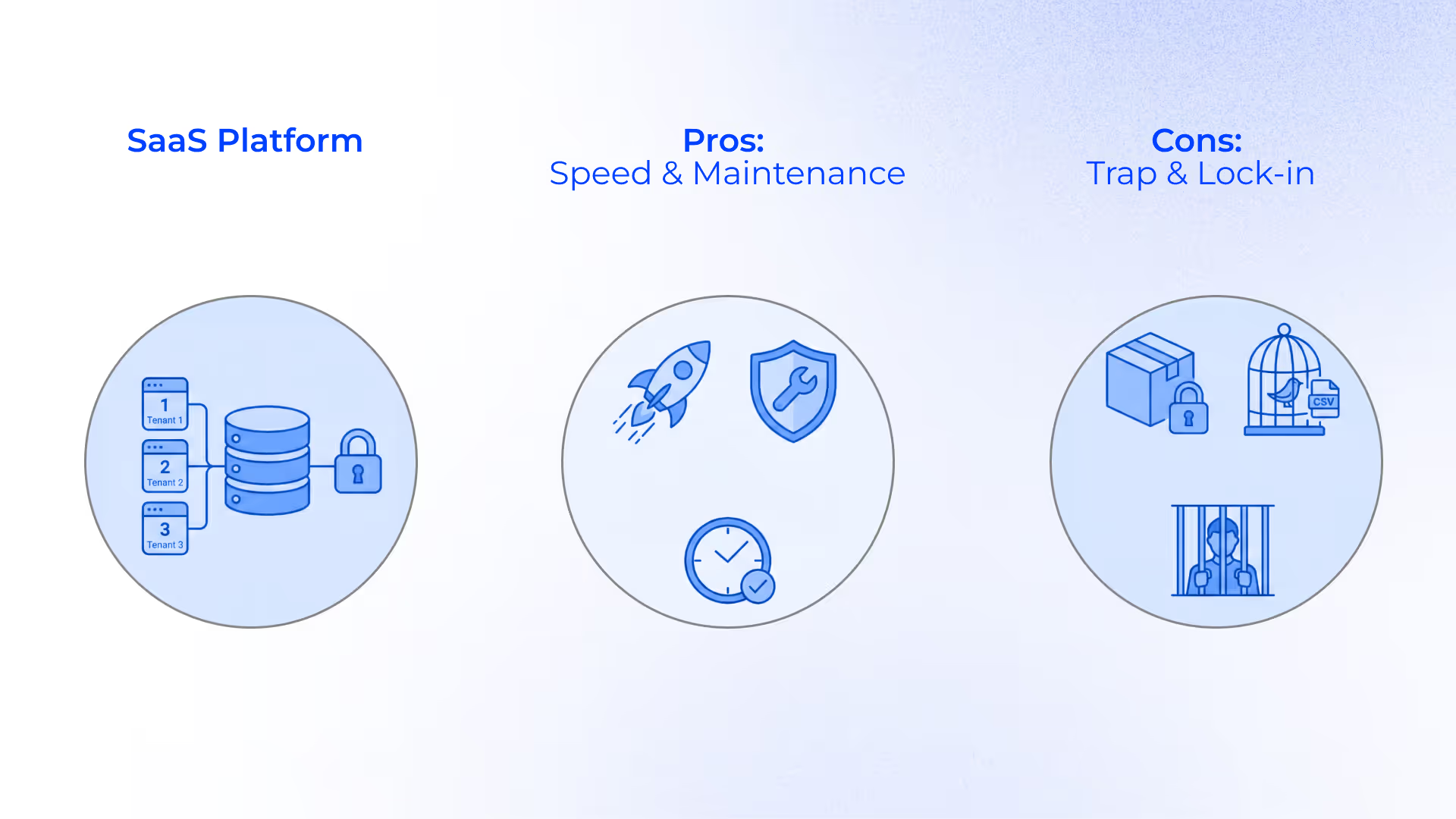
Option A: Ready-to-Use SaaS for Online Learning
SaaS platforms rely on multi-tenancy. You and 10,000 other customers share the same database and the same codebase. Your data is logically separated by a Tenant_ID in the database. But it physically lives on the same hard drive.
Pros:
- Speed. Deployment takes days, not months.
- Maintenance. The vendor has already implemented key security features and deals with security patches and server uptime.
Cons:
- Logic trap. This is the dealbreaker for innovative companies. SaaS platforms are opinionated. You cannot change the software. Instead, you may need to change your business to fit the software.
- Vendor lock-in. Try exporting your data. You will likely get a CSV of user names and grades. You will not get the detailed behavioral logs, the interaction history, or the relational mapping. If you leave, you lose your intelligence.
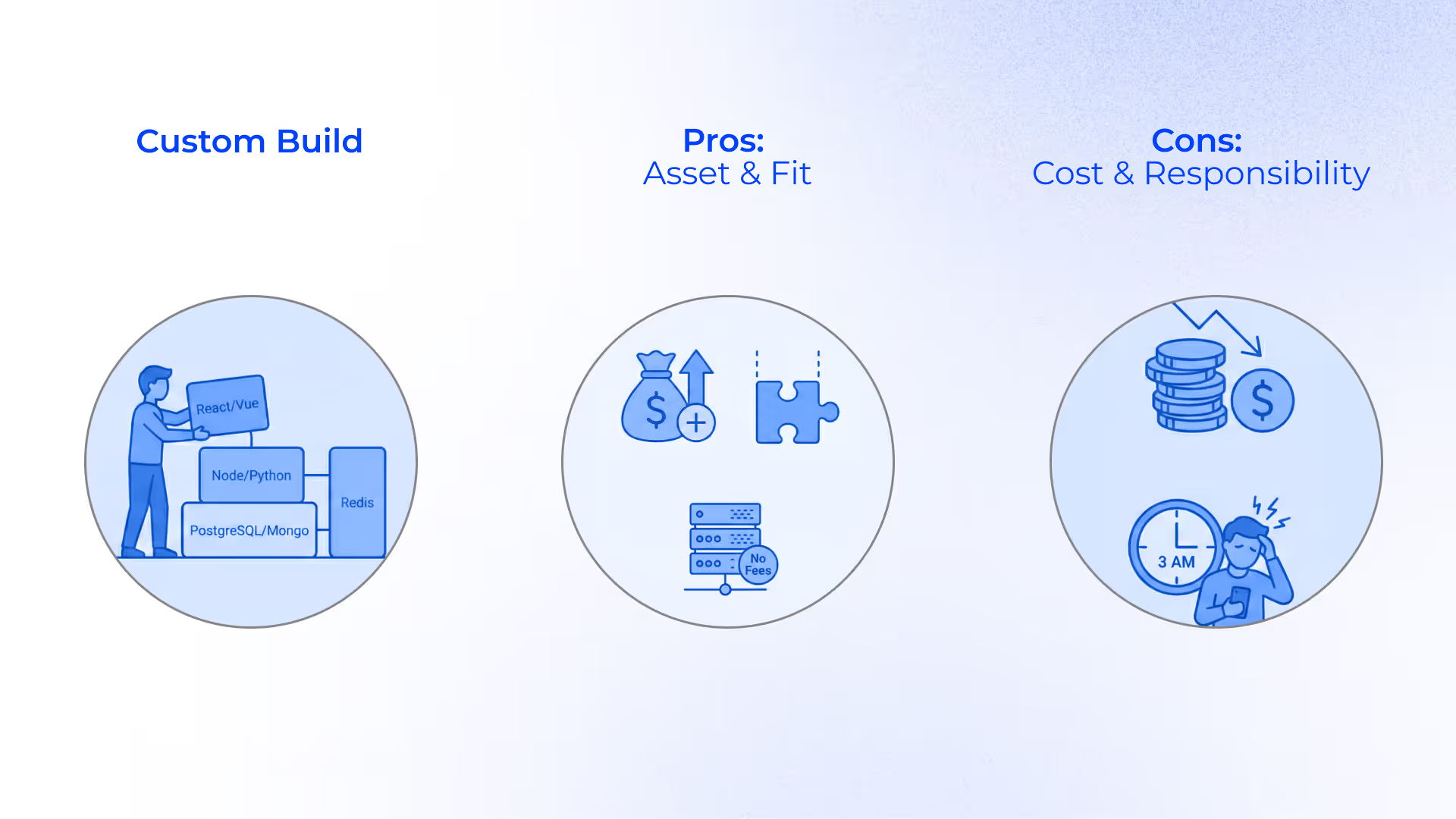
Option B: Custom Build
You build your platforms based on your needs and technical requirements.
Typically, a modern stack involves:
- Backend: Node.js, Python (Django/FastAPI), or Go.
- Database: PostgreSQL (Relational data) + MongoDB (Content data) + Redis (Caching).
- Frontend: React, Vue.js, or Angular.
Pros:
- IP valuation. The software becomes an asset on your balance sheet. It increases the valuation of your company.
- Perfect fit. You build exactly the workflow you need. If you need a unique pricing model (for example, you want users to pay per percentage of course completed), you code it.
- No license fees. You pay for server usage (AWS/Azure), not per-user seat licenses.
Cons:
- High upfront cost. You are paying for a development team (or an agency).
- Responsibility. You are the CTO. If the server goes down at 3 AM, it is your problem (or your agency's support SLA).
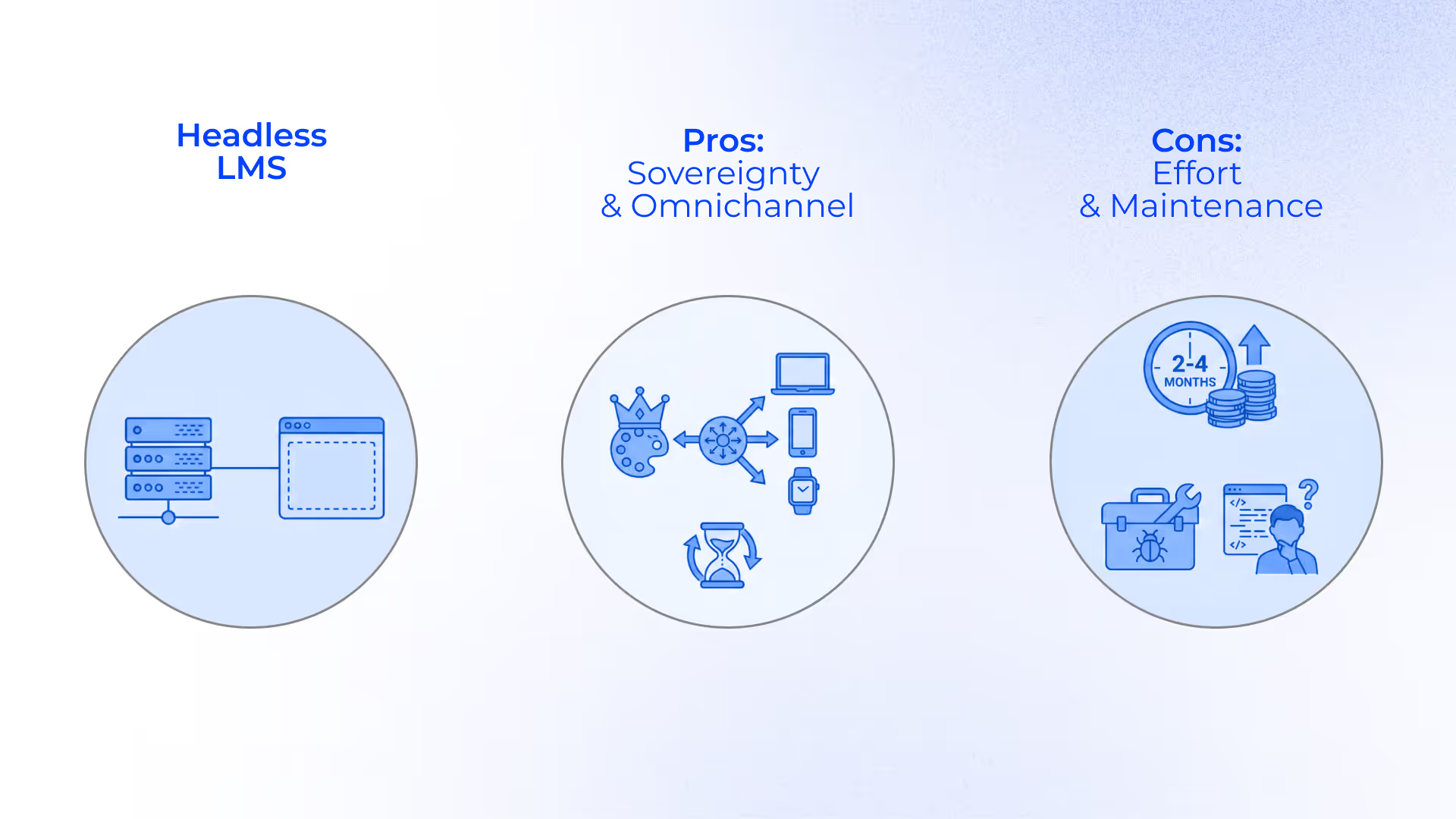
Option C: Headless LMS (Compromise)
Headless platforms are the modern trend. In this case, you use a headless backend (a pre-built engine that handles user authentication, database management, and basic LMS logic). But it has no frontend. It is just an API. You can build a custom frontend (head) using React or another framework.
Pros:
- Total frontend sovereignty. You are not constrained by the vendor’s rigid templates or spaghetti CSS. You build the interface exactly as your designers envision it. Thanks to this, your learning management system doesn't look like a separate training portal. It can look and feel like your product.
- Omnichannel delivery. Write once, deploy everywhere. Since the backend is just an API (REST or GraphQL), it doesn't care where the data goes. You can serve the same course content to a web dashboard, a native mobile app, a smartwatch notification, or a custom widget inside your existing intranet or a customer relationship management system.
- Future-proofing the stack. Frontend technology moves faster than backend logic. In 5 years, when today's frontend framework is obsolete, you can rewrite only the head without migrating your database or user records.
Cons:
- Higher initial development effort. The system comes with zero user interface. You cannot just turnit on. You must budget for a frontend engineering team to build every screen, including the login page, the course player, the dashboard, and the profile settings. This adds 2-4 months to your launch timeline compared to a monolithic learning management system.
- Frontend maintenance liability. You own the frontend code lifecycle. You need internal resources for QA testing across devices, accessibility compliance, and bug fixes.
This model definitely sounds like a compromise between off-the-shelf and custom solutions. But is it really a universal one? There are several scenarios when it is a viable option, as well as those when it’s better to consider another model,
Adopt headless if:
- You have an internal development team (or a partner agency).
- Your brand identity is non-negotiable.
- You need to embed learning content into other existing apps.
Avoid headless if:
- You need to launch next week.
- You have zero engineering resources.
- Standard templates are acceptable for your use case.
Cost Analysis: Where Does Your Money Go?
To understand the financial architecture of your LMS choice, you should look past the monthly sticker price.
SaaS vendors operate on a rent-seeking model. They subsidize the entry cost to get you in, but monetize your growth. As you scale, your success becomes a tax. At the same time, a custom solution front-loads the investment to eliminate marginal costs later.
Here is the breakdown of where your budget actually goes in a SaaS and custom model.
What is the main conclusion you should make?
SaaS is optimized for low friction to start.
Custom is optimized for low friction to scale.
Conclusion: Future-Proofing Your EdTech Business
The EdTech market is saturated with feature-rich platforms that are architecturally bankrupt. They look impressive in a sales demo. But they crumble under the load of real-world usage.
To protect your capital and your user base, you need to reject the feature war. Your strategy should focus on three critical things:
- Resilient architecture. Prioritize offline synchronization, API limits, and load balancing over cosmetic user interface features.
- Ruthless efficiency. If a feature does not directly improve learner retention or reduce administrative overhead, it is bloat. Cut it.
- Data sovereignty. Ensure you are not locking your student records into a proprietary format. You need direct access to your raw data to drive business intelligence.
If you see that your organization has outgrown the rigid constraints of generic SaaS, it’s time for you to consider LMS software development. Your custom platform can become your strategic asset rather than a utility. Let’s discuss how to build the right infrastructure for your needs.
FAQs
What are the key features of an LMS?
From an architectural standpoint, a robust learning management system requires four pillars:
- Identity management (IdP): Granular Role-Based Access Control (RBAC) to handle hierarchy (for instance, Student, Instructor, Admin, Super-Admin) and SSO integration (SAML/OAuth).
- Content interoperability: Support for standard protocols (SCORM 1.2/2004, xAPI, LTI 1.3) to ensure content portability.
- Assessment tools: A logic layer that is responsible for quizzes, branching scenarios, and automated grading triggers.
- Reporting layer: A database capability (SQL or NoSQL) that tracks learner progress, aggregates it, and visualizes completion rates, drop-off points, and compliance gaps.
What is LMS software used for?
It is the infrastructure layer for knowledge sharing and compliance verification. In the corporate environment, it helps automate the audit trail for mandatory training (for example, cybersecurity or harassment) and employee development. It standardizes onboarding workflows to reduce ramp time for new hires. In education, it acts as the digital campus and optimizes the learning process. It centralizes curriculum delivery, grading, and student communication into a single system of record. This helps educational institutions replace fragmented email and spreadsheet workflows.
What are the top 5 LMS systems?
The choice of the best learning management systems depends on your architectural needs and sector. Modern platforms offer different learning styles and learning paths. Here are the most popular solutions used by organizations worldwide:
- Canvas. It is a standard for higher education. This SaaS-based platform is known for high reliability and excellent LTI integration. Institutions can easily connect third-party services such as virtual classrooms and labs, video conferencing tools, assessment tools, and learning material libraries.
- Moodle. This open-source learning management system is the best for organizations that need full code access and custom plugin development (PHP stack). Moodle allows teams to modify course management functionality, add advanced LMS features, develop custom plugins, and tailor workflows to very specific compliance or training needs.
- Docebo. It is a leader in employee training. The team behind it heavily invests in AI for content tagging and recommendation engines. Docebo is well-suited for companies focused on upskilling, reskilling, and measuring the business impact of learning programs.
- Blackboard Learn. Blackboard Learn is a long-standing enterprise LMS. It offers a broad feature set and strong administrative controls. However, organizations running older implementations may face technical debt, including legacy configurations and less flexible integrations.
- TalentLMS. It is a lightweight, cloud-first option ideal for SMBs. It provides everything needed for deploying and starting to create courses as fast as possible. TalentLMS delivers strong value for compliance training and basic professional development programs that help achieve new career goals.
What are the two main functions of LMS?
A learning management system (LMS) solves two specific engineering problems: content delivery and tracking. The CDN layer is responsible for hosting and streaming educational assets (video, text, interactive SCORM packages, and other training materials for online and asynchronous learning) to the end-user with low latency.
Meanwhile, the data layer is intended for recording user interactions (time spent, scores, completion status) into a persistent database to prove competency or compliance.
What are the 7 key features of effective learning?
Translated into technical requirements, effective learning requires:
- Accessibility (compliance with WCAG 2.1 AA standards, including screen readers, keyboard navigation, etc.)
- Micro-learning support (architecture that supports bite-sized content rather than massive monolithic training modules)
- Interactivity (xAPI support to track active behaviors)
- Feedback loops (automated grading logic that provides immediate results to the user)
- Adaptive learning paths (If/Then logic that routes users to different content based on training success assessment)
- Social reinforcement and partner training (integration with communication APIs)
- Learning journey analytics (data visualization that allows admins to monitor learning outcomes and diagnose skill gaps)
What makes a good LMS?
There are several criteria that help you understand whether a solution aligns with modern standards. The platform’s frontend should load in under 2 seconds, using effective caching and CDN). The backend should be able to handle high concurrency (for example, 5,000 users taking a final exam simultaneously) without database locks. Meanwhile, it should act as a hub and smoothly pass data to the SIS (Student Information System) or HRIS via API without requiring manual CSV exports.
What are the latest trends in LMS technology?
The current trends include:
Headless architecture. Decoupling the backend from the frontend allows companies to build a custom user interface using a standard LMS engine for the heavy lifting.
AI-driven content generation. LLMs help auto-generate quizzes for skill development and knowledge retention, as well as prepare summaries from video transcripts to increase training effectiveness.
LXP (Learning Experience Platform). This approach presupposes a shift from instructor-led training programs to Netflix-style discovery that relies on recommendation algorithms.
Data sovereignty. Today, we can observe a move away from multi-tenant SaaS black boxes toward single-tenant private clouds where the organization owns the raw data.