

For some universities, student information system (SIS) software creates more administrative problems than benefits. In addition, it requires extra costs. It shouldn’t be this way. Your SIS is much more than just a collection of dashboards and report cards. When properly built and implemented, it becomes the central nervous system of your educational institution.
It streamlines processes, reduces manual work, and gives administrators, faculty, and students real-time access to the information they need. As a result, when it fails, your losses can be much more serious than you can imagine. Its failure will impact your data, revenue growth, and, even more importantly, student success.
If your architecture is brittle, the whole campus feels it. With our expertise in edtech app development, we have prepared this guide that explores the engineering reality behind building and implementing modern student information system software that scales without crashing.
Student Information System in 2026: What You Should Know
To make an informed decision on whether you should invest in building or modernizing your SIS software, you should understand the value that it brings.
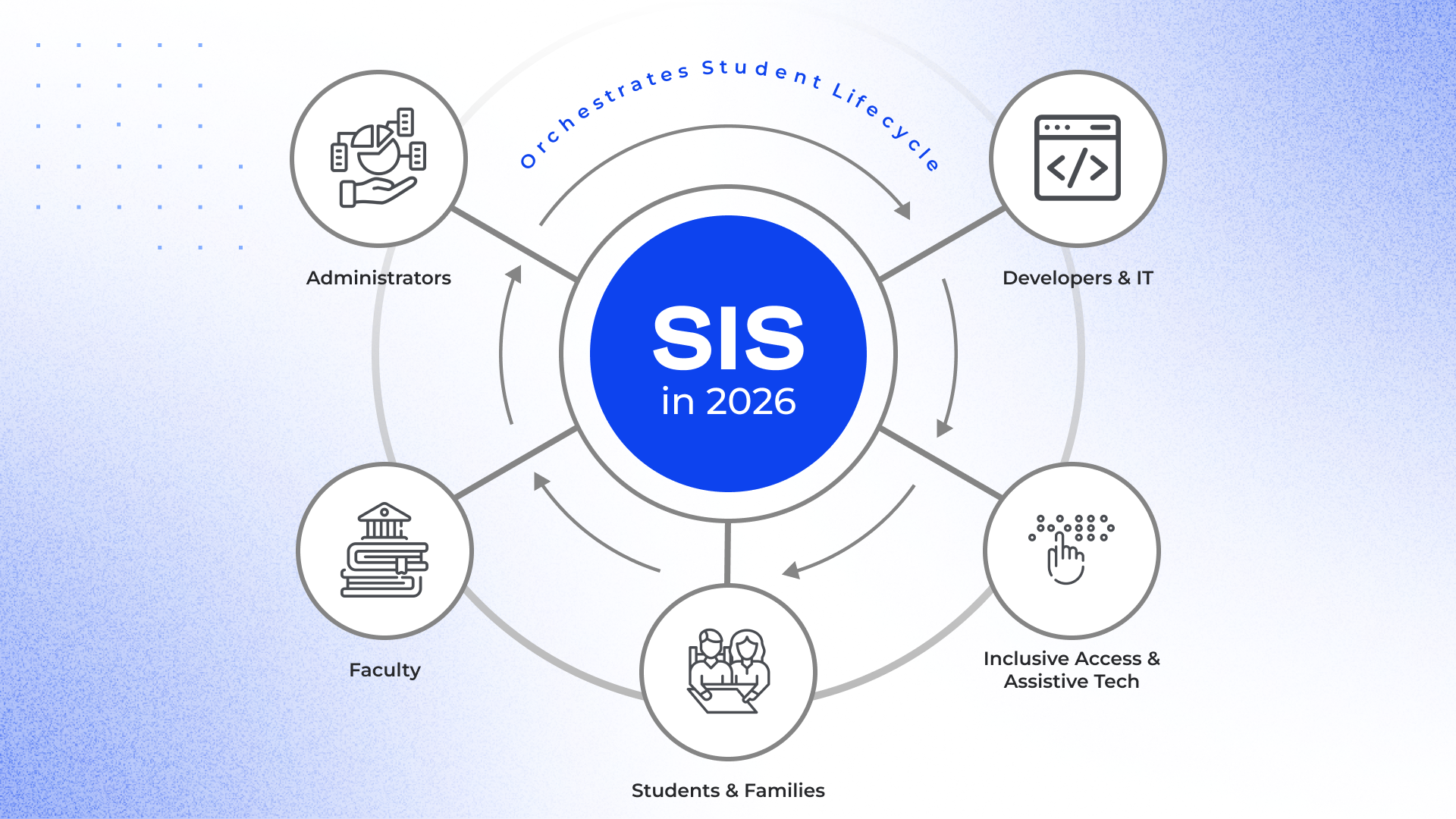
In 2026, with all the available features and integrations, it orchestrates the entire student lifecycle. It acts as the single source of truth for several categories of stakeholders with conflicting requirements:
- Administrators demand immutable financial reporting and high-level analytics.
- Faculty need click-light workflows. If grading takes 17 clicks, educators will revert to Excel and break school data integrity.
- Students and their families expect a user-friendly, mobile-first experience. They demand sub-second latency during program selection, similar to a modern e-commerce checkout.
- Developers and IT experts require an API-first backend. They care about horizontal scaling during enrollment spikes and pay less attention to the dashboard aesthetics.
Users with special needs require much more than just a color-contrast toggle. In 2026, people expect to get screen-reader optimization, text-to-speech and speech-to-text tools, as well as other assistive technologies.
Why You Still Need EdTech Developers in 2026
"We'll just buy a market leader, and it will work out of the box." That’s what many educational institutions think. But it is a trap.
The reality is that platforms like Ellucian Banner, PowerSchool, and Workday Student are engineered for the "average" institution. If your university deviates from the standard operating model by even 10%, you enter the customization zone. And you should be ready that your costs will balloon.
Even with a Tier-1 SaaS, you will likely spend 2x the annual license fee on implementation engineering.
Why Giants Aren't Enough
While these platforms are robust, their architectural trade-offs create immediate gaps for modern institutions.
- Ellucian (Banner/Colleague). This solution is powerful. But historically, it relied on older, monolithic database structures. Modernizing the frontend or extracting real-time student data often requires heavy SQL expertise or expensive add-on modules.
- PowerSchool. It is the dominant force in K-12. Through aggressive acquisitions, PowerSchool has built a massive ecosystem. However, this results in a "Frankenstein" architecture where disparate modules don't interact fluidly and can't run quickly. In this case, your team needs to build bridges between them.
Workday Student. As of October 2025, over 85 institutions worldwide were the clients of this cloud-native platform. It is one of the solid choices, which is still far from universal. It forces you to adapt your business processes to its Power of One data model. Customizing the core logic is virtually impossible.
Role of Middleware
Sometimes, university boards believe that if they buy a license for a ready-made platform, they won’t need to invest in engineering efforts. Nevertheless, it’s far from being true. Even in such a situation, you can’t avoid working with developers. A SIS in isolation can’t fulfill its core functions and support the full academic and digital experience expected by stakeholders.
Engineering skills are required to build the connective tissue (middleware) between it and your other systems to maintain the necessary workflows.
Let’s suppose that you have an SIS that communicates via SQL/REST. Your LMS (Canvas) relies on LTI 1.3. Your CRM (Salesforce) operates through SOAP and Apex. These systems were not designed to communicate with one another out of the box.
Without middleware, admissions teams resort to manually exporting CSV files from Salesforce and uploading them into Banner. This introduces security risks and operational inefficiencies.
To avoid this, you can turn to developers. They can design and maintain a translation layer that enables these platforms to exchange student data reliably and securely.
{{cta}}
When Custom SIS Development Becomes Strategic Imperative
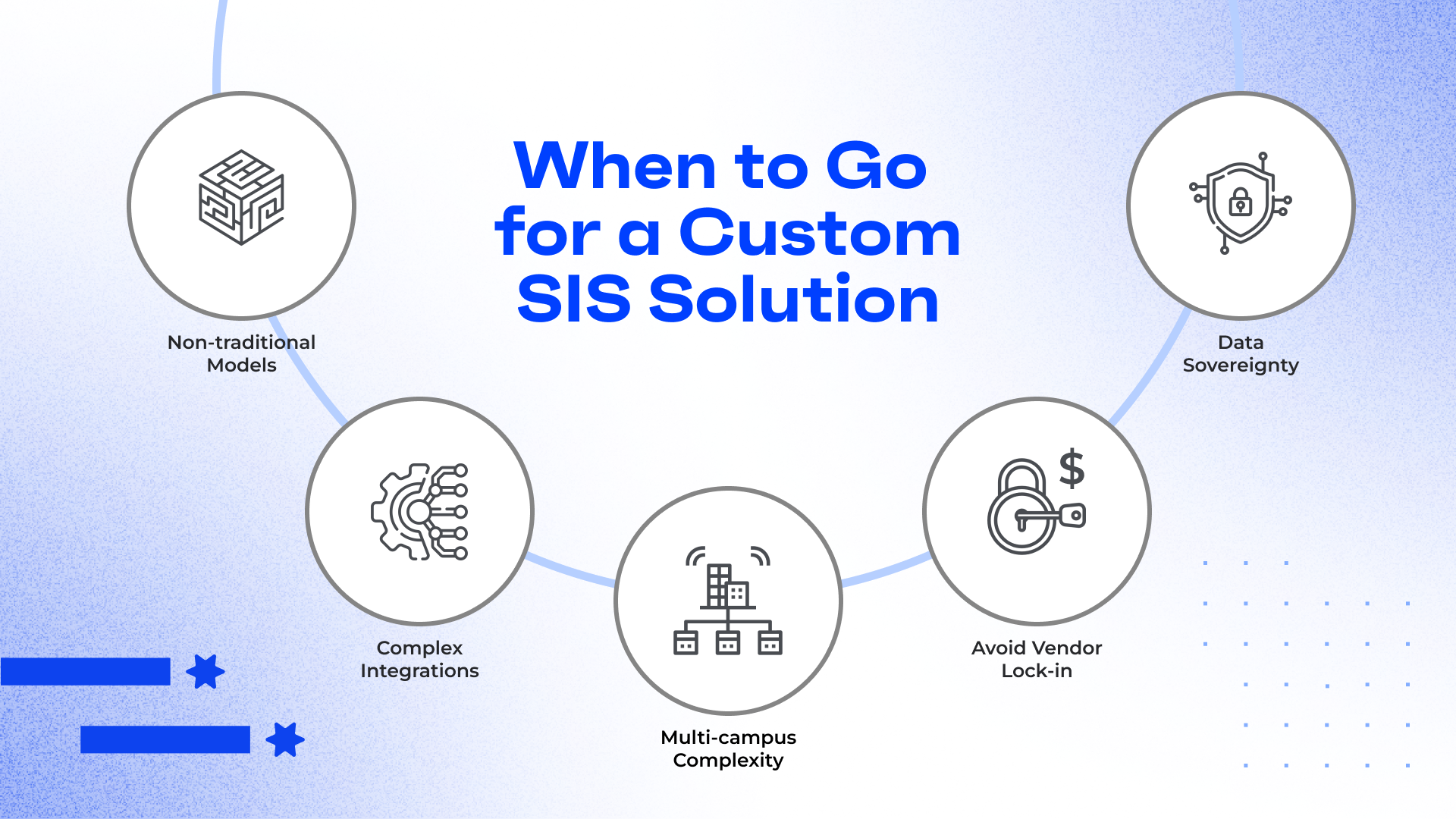
Buying off-the-shelf seems a safe default. But in some scenarios, this approach can only add extra hurdles, instead of helping overcome them. If you recognize your case among those mentioned below, a custom build should be a preferred option for you.
Case 1. Your institution has non-traditional tracks
Standard SaaS databases are built on rigid, decades-old architectures hard-coded for "Semesters" and "Credit Hours." They view education as a function of time.
These systems fail miserably at Competency-Based Education or micro-credentialing, where time is variable, and mastery is fixed.
Trying to force a mastery-based model into a time-based database requires expensive workarounds that degrade the user experience and corrupt your reporting data. Custom development allows you to build a schema that natively understands skills rather than just seat time.
Case 2. You need total data sovereignty and compliance
If you operate in a jurisdiction with strict data residency laws (for example, EU GDPR or specific markets in Asia/the Middle East), relying on a US-centric cloud SaaS is a vulnerability.
Custom development gives you total control over your infrastructure, allowing you to host data physically within national borders on local cloud instances or on-premise servers to guarantee comprehensive legal compliance.
Case 3. You want to avoid vendor lock-in, where license fees grow 10% annually
The "SaaS trap" occurs when the cost of the software rises. Many legacy vendors increase license fees by ~10% annually while their feature velocity slows to a crawl. You end up paying more for the same stagnant product.
When you are locked in, you have zero leverage to demand specific roadmap features. Owning your source code shifts the dynamic from renting a service to investing in an asset. As a result, you can be sure that every dollar spent contributes to your institution’s specific roadmap, not the vendor’s profit margin.
Case 4. You need complex, bi-directional integrations with other systems
Off-the-shelf platforms are walled gardens. They may offer standard APIs. But they struggle to act as the true central nervous system for your complex EdTech environment.
If your institution relies on a best-of-breed stack (for instance, a specific LMS, a niche CRM for admissions, a separate financial aid tool, and an assessment platform), a standard SIS often forces you into "flat file" transfers or nightly batch updates. Real-time data synchronization becomes impossible.
Custom development allows you to build an API-first architecture. Instead of fighting the SIS to release data, you build a system designed explicitly to push and pull data in real-time across your specific stack. This eliminates data silos and ensures that a change in one system is instantly reflected everywhere.
Case 5. You need to consolidate multi-campus or M&A complexity
Large educational groups, especially those growing through mergers and acquisitions, inherit a chaotic mix of different legacy systems across various campuses.
Trying to migrate five different acquired colleges onto one rigid commercial SIS often results in a very confusing configuration that serves no one well. As a result, you lose the nuance of how each campus operates, or you will need to pay for five separate instances that cannot talk to each other.
A custom multi-tenant architecture allows you to share core resources (like finance and HR data) at the group level. At the same time, you can permit individual campuses to maintain their distinct academic structures and workflows.
How to Fix Your System Rot without Full Rewrite
If you already have software of this type, you should be prepared for the fact that, over time, platforms tend to become outdated.
However, you don't always need to burn the legacy system down and start building a new one fully from scratch. With the right development team by your side, there is an option to repair a failing system. Here’s how the most common problems with legacy platforms can be solved.
Problem 1. 17-Click Workflow
Educators need to make 17 clicks and wait for three screen reloads to access data or change a grade? It’s quite natural that they revert to local Excel spreadsheets that are never backed up.
Bottleneck: The legacy frontend is tightly coupled to the database logic. Validating a field requires a full page reload.
How to fix: The implementation of headless UI is a good solution. Our developers can build a modern, isolated frontend (using React or Vue.js) that sits on top of your legacy system. It communicates via REST or SOAP APIs. The user gets a consumer-grade experience. Meanwhile, the legacy database remains the system of record.
Problem 2. Student Data Fragmentation
Your SIS says a person is enrolled. The Library system says they aren't. The LMS is somewhere in between.
Bottleneck: This happens when systems sync via nightly batch jobs (CSV exports) instead of real-time connections. Data is always 12–24 hours stale.
How to fix: The rescue is an event-driven architecture. We can deploy a Message Broker (like RabbitMQ or Apache Kafka) to act as the traffic controller. Instead of telling the LMS to update, the SIS publishes a relevant event. The related systems subscribe to that topic and update themselves instantly. As a result, all stakeholders will be on the same page.
Problem 3. Mobile App Performance Crawl
Students abandon your mobile app because it takes 8 seconds to load their schedule.
Bottleneck: Over-fetching is a key problem in this case. To get a student's class name, the legacy API forces the app to download the entire student profile (address, billing, GPA history), wasting bandwidth.
How to fix: We can insert a GraphQL middleware server between the frontend and your legacy APIs. It will allow the mobile app to request exactly what it needs and nothing else. As payload size reduces by 90%, load times will drop to <500ms.
Problem 4. Registration Crashes
Your system runs fine 364 days a year. But at 8:00 AM on a registration day, 5,000 students hit Enroll simultaneously, and the database locks up.
Bottleneck. Very often, synchronous processing, not CPU, is the problem. The system tries to write every enrollment to the database instantly while the user waits. As the database cannot handle the concurrency, requests time out.
How to fix: This problem can be solved by stopping writing directly to the database during spikes. We place a high-throughput queue (like Amazon SQS or Redis) between the enrollment UI and the database. The UI accepts the request instantly, and a background worker processes the queue at a rate the database can handle.
Problem 5. Poor Data Management and Hygiene
You have three records for "John Smith," "J. Smith," and "Johnathan Smith" because the platform lacks validation. This breaks reporting and decision-making and may also cause financial aid errors.
Bottleneck: The legacy system accepts whatever string is typed into the field without checking against existing records first.
How to fix: We can build a validation layer that sits in front of the Create Student API. Before a new record is written, it runs a Fuzzy Logic algorithm to check for near-matches in the existing database.
Migration Triggers: When It’s Time to Say Goodbye to Monolith
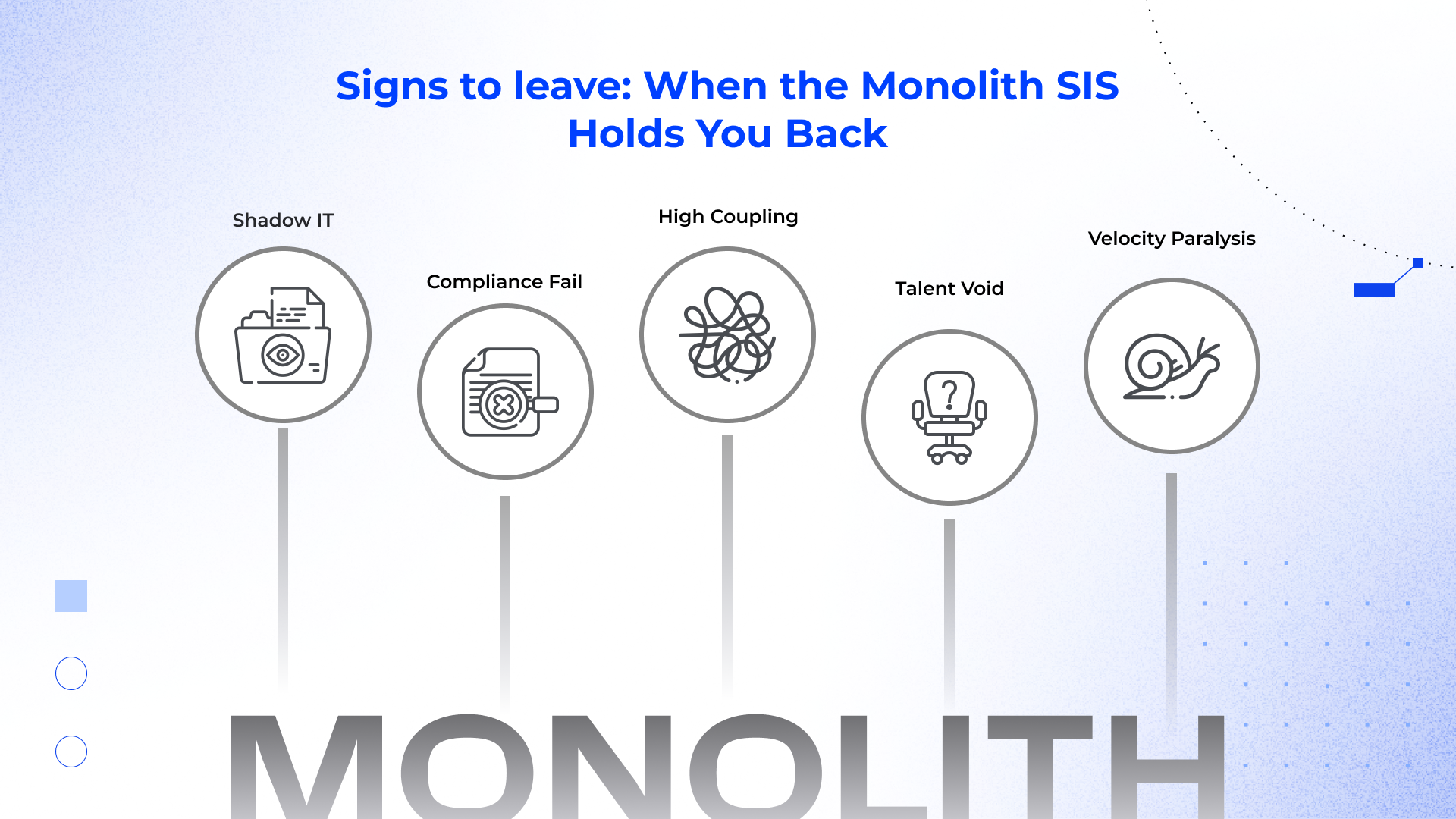
How do you know when a patch isn't enough? Here is your diagnostic checklist. If you hit 2 or more of these, your system is effectively dead.
- "Shadow IT." When users bypass the system to do their job, the solution has already failed. An unofficial spreadsheet for each department is definitely a bad sign.
- Compliance failure. Can you execute a "Right to be Forgotten" request in under 48 hours? In many monoliths, student PII is hard-coded into unstructured logs, backup blobs, and orphan tables. Deleting it breaks referential integrity, causing the app to crash.
- High coupling. In a monolith, everything touches everything. You cannot isolate risk. Even a minor patch to the Alumni module can accidentally take down the Bursar module.
- Talent void. Your stack relies on deprecated versions of PHP, older Java frameworks (Struts/Spring 2), or proprietary stored procedures? With every year, it will become more and more difficult to find developers who are ready to work with this code.
- Velocity paralysis. If connecting a modern tool (e.g., Stripe for payments or Hubspot for CRM) is treated as a high-risk capital project, it’s time to think about moving away from the monolithic architecture.
Student Information System Software Development: Cost and Timelines
Any successful project requires transparent budgeting. In EdTech, "cheap" is expensive. A low initial bid often hides the cost of change orders, failed migrations, and technical debt.
Below is a realistic baseline for a 2026 budget.
| Project Tier | Estimated Cost | Timeline | What You Actually Get |
|---|---|---|---|
| SaaS implementation and customization | $50k – $150k | 3 – 6 months | Setup: Config of off-the-shelf SIS (PowerSchool/Ellucian). Data: Basic CSV import of student records. Integrations: Standard connectors (LMS/Billing) only. Limit: You are stuck with their roadmap. No source code ownership. |
| Custom modular SIS (MVP) | $150k – $300k | 6 – 9 months | Only core functionality: Admissions, Student Registry, and Grading modules. Architecture: Modern, API-first backend (Node.js/Python) + React frontend. Ownership: Full IP rights. You own the code. |
| Enterprise migration (full scale) | $500k+ | 12 – 18 months | Scope: Full replacement of legacy monolith. Data: Complex historical data migration & cleansing (10+ years). Ecosystem: Bi-directional sync with 5+ external systems (SAP, Salesforce, Canvas). |
Note: Software is never "done." Once the system is live, your budget shifts from Capital Expenditure to Operational Expenditure. Always budget 15–20% of the initial build cost annually for maintenance. If you spend $200k building an MVP, reserve $40k/year for keeping it alive.
Building the Future of Your Institution
Today is a good time to focus on tomorrow. The next decade of education will be defined by artificial intelligence: predictive analytics, AI-driven retention, and platforms supporting personalized learning. You cannot deploy AI if your data is trapped in a proprietary vendor "black box" or scattered across unstructured CSVs. An obsolete system will simply anchor your institution in the past.
And remember: your students are digital natives. If your SIS feels like a relic from 2006, they won’t tolerate the experience or the institution behind it.
Is your system ready for AI, or is it stuck in the previous era?
At Akveo, we build data-first architectures designed for the epoch of machine learning. Want to learn more about our approaches to student information systems development? Let’s discuss how we can transform your SIS from a passive storage repository into an intelligent engine that drives improved engagement and student success.
FAQs
What is the best student information system?
There is no single best system. Every case requires an individual approach. The market leaders (for example, Ellucian, PowerSchool, or Workday) offer robust general features. But at the same time, they often lack flexibility for unique institutional needs. The best system is one that matches your specific academic model. Depending on your unique requirements, it can be a customized SaaS implementation or a bespoke build.
What is the difference between ERP and SIS?
An ERP (Enterprise Resource Planning) is the umbrella term for solutions that manage an organization's financials, HR, supply chain, and other administrative tasks. An SIS (Student Information System) is a specialized type or module of ERP. It focused specifically on student data: student performance, student behavior, enrollment, and transcripts. In modern architectures, the SIS often feeds data into the ERP.
How is SIS different from an LMS?
The SIS manages administrative data. It answers the questions on who the student is, whether they have paid, and what their transcript is. The LMS (Learning Management System), like Canvas or Blackboard, manages the learning process (online training programs, course content, quizzes, discussion boards). The SIS shares attendance on a particular date with the LMS. In its turn, LMS sends grades back to it.
What is Banner Student Information System?
Banner is an ERP and SIS product developed by Ellucian. It is widely used in higher educational institutions to manage student information, financial aid, and human resources. It is a legacy system, and its older versions can’t fully address the ongoing needs of institutions and support their growth. That’s why many of them are currently modernizing their solutions or migrating to the cloud.
What does a student information system do?
It acts as the database of record for an educational institution. It handles student registration, enrollment, grade recording, transcript generation, attendance tracking, scheduling, document management, and other operations. Technically, it orchestrates data flow between the finance office, the registrar, and the classroom.
What is Aeries student information system?
Aeries is a popular SIS that is primarily used in K-12 districts, particularly in California. It focuses on attendance, grading, academic progress reports, and parent portals. This facilitates communication between schools and families.
What is PowerSchool student information system?
PowerSchool is one of the largest providers of K-12 technology products. Its SIS is known for its modularity and seamless integration with other K-12 tools. Nevertheless, users often cite complexity in customization as a hurdle.
What is Frontline student information system?
Frontline Education provides software focused on K-12 administration. Their SIS is often integrated with their special education and school health management software. This makes it a common choice for districts prioritizing those specific workflows.
How does student information system work?
At its core, an SIS is a relational database wrapped in an application layer. It stores data entities (Students, Courses, Instructors) and maps relationships between them. Modern systems use APIs to push and pull this data to other applications. Seamless integrations help ensure real-time consistency across the school's network.
How to make student information system?
This task requires a product engineering approach and senior-level engineering expertise. You should begin with database schema design (defining entities and relationships), choose an efficient tech stack (e.g., Node.js/Python backend, React frontend, PostgreSQL database), and prioritize security architecture (RBAC, encryption).
How to use student information system?
Usage depends on your role. Administrators use the backend dashboard to run comprehensive reports and manage enrollment windows. Teachers and educators use the portal to input attendance and grades to monitor student success and get data-driven insights. Students and their families access the frontend of a web or mobile app to view schedules, check announcements and report cards, as well as pay fees and track academic progress.