

Low-code technologies bring a new era of software development, allowing programmers to build complex solutions more easily, faster, and with lower investments.
In this article, we will continue reviewing the pioneering low-code development platforms. This time, we will take a closer look at Appsmith, which is one of the most rapidly evolving platforms of this kind for internal tool development and workflow automation. Among the questions that we will answer in this blog post are "What is Appsmith?", "What benefits does it have?", and "When is it sensible to choose this platform?".
What is Appsmith?
Appsmith is an open-source low-code internal tool builder. With the help of this powerful tool, you can create custom work dashboards, admin panels, CRUD tools, and automated workflows. All this is possible without writing extensive code.
It was launched in 2020, and since then, it has been developing really fast, expanding its functionalities.
What is the use of Appsmith?
Appsmith focuses on the front-end part of the apps and doesn't require deep coding skills to build internal tools. Appsmith's tools can be connected to a large number of data sources. With Appsmith, you can build your custom applications without extensive code, which is possible thanks to the availability of 40+ ready-made components and widgets.
The handy drag-and-drop interface with the comprehensive canvas lets users compile those components easily. You can construct your app from UI components and widgets as if from building blocks, placing them on the open grid-style canvas. On top of that, you can code for custom data transformation and create custom business logic using JS.
Key features of Appsmith
Now, after answering the question "What is Appsmith?", it's time to explore the core features of this platform.
Customization capabilities and white-labeling
Working with Appsmith, you are able to write custom JS, HTML, and CSS code to transform data and add custom app logic. Besides, you can make branded or white-label apps by removing Appsmith's logo.
Multi-user plans
Unlike many other low-code development platforms, Appsmith offers multi-user support by default. If you have a large team and the per-user payments will be a burden on your budget, Appsmith is a great choice.
SOC 2 compliant
The platform has the SOC (System and Organization Controls) 2 certificate, which makes it stronger in terms of security, availability, and testing.
Native integrations with data sources
Appsmith has pre-built connectors to extract data from databases directly or through the REST APIs. The list of data sources accessible in Appsmith includes MongoDB, PostgreSQL, MySQL, and the Salesforce CRM system. Additionally, you can connect the tools with GraphQL and Google Sheets. Moreover, Appsmith allows users to query and update the info directly from the app.
Hosting
You can host your Appsmith low-code application in the cloud, on your own server, or using embedded hosting. The platform allows you to self-host on Kubernetes, AWS, Docker, Digital Ocean, and Heroku. Appsmith provides a high level of data security for cloud-hosted and self-hosted applications by protecting the data with the AES 256 encryption protocol.
Development process
The development process with Appsmith is pretty straightforward and is mainly built around the possibilities of the drag-and-drop interface. You can create responsive and dynamic UIs with little or no coding skills by using pre-made UI components. A simple drag-and-drop interface combined with a manageable canvas allows non-professional users to arrange the UI elements of the app.
Merge update: Git sync and version control workflows
Appsmith integrates tightly with Git, which allows you to sync apps and manage versions. Its IDE includes a new granular Git commit modal that shows detailed diffs by resource (queries, JS objects, pages). This makes it easier to review changes before updates are merged into staging or production branches.
Commits are reviewed through your external Git system. Once merged, Appsmith can automatically pick up the changes during deployment.
AI copilots
Today, Appsmith supports natural language-driven development.
With its AI copilots, you can describe a widget or business logic in natural language that you use in communication with your friends or relatives. The platform is able to understand it and generate UI code, JS logic, or SQL queries based on your prompt.
Pricing plans: What you need to know
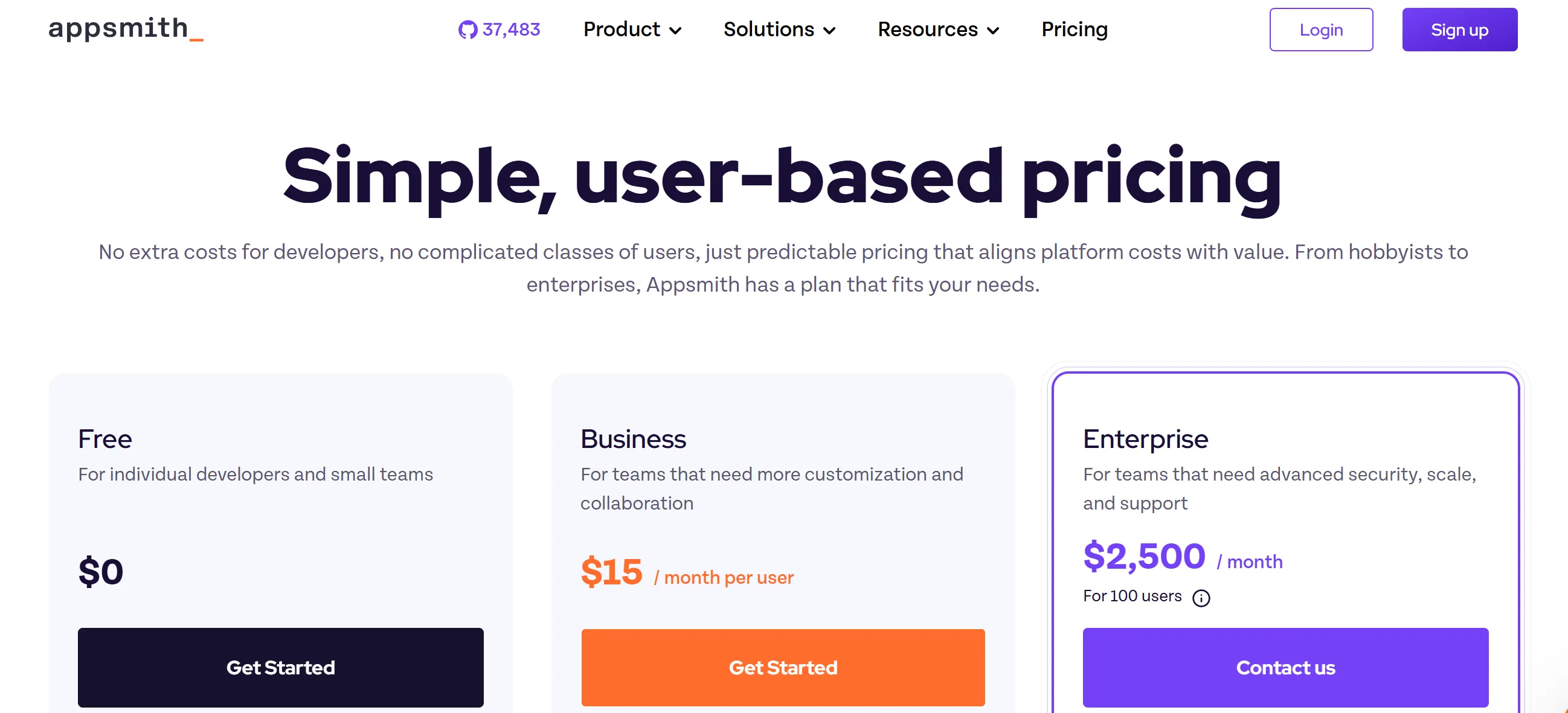
Appsmith provides several plans for users with different needs and requirements.
Free plan
This option is a good choice for small teams and individual developers. Of course, it has obvious limitations in comparison with paid tiers. Nevertheless, it offers basic functionality for exploring the possibilities of the platform.
This plan includes up to 5 workspaces, up to 5 users (for the cloud version), version control with Git, Google SSO, and 3 standard roles for access control, among other features.
Business plan ($15 per month per user)
This plan is targeted at teams that are looking for customization and efficient collaboration.
In addition to everything that is available in the free plan, this tier includes up to 99 users, unlimited environments, Git repos, and workspaces, audit logging, custom roles and access controls, as well as reusable packages and premium integrations.
It's important to highlight that users of the business plan can also remove the “Powered by Appsmith” logo.
Enterprise plan ($2,500 per month for 100 users)
The enterprise plan was designed with the needs of bigger teams in mind. It provides advanced security and better conditions for scaling.
Users of this plan can enjoy such features as SAML and OIDC SSO, managed hosting, custom integrations, and much more.
Pros & Cons
Let's consider both strengths and weaknesses of this low-code software development platform.
Benefits of Appsmith
- Super‑fast deployment. You can self-host Appsmith in about five minutes. It’s truly plug-and-play for internal tooling setups.
- Drag‑and‑drop UI builder. Widgets can be easily added, resized, and styled without touching HTML or CSS. Offers more than 45 components like tables, forms, chart creators, and buttons.
- Database interaction via responsive UI. You can create, read, update, and query data directly within the interface. No external tooling is required.
- Ready-made connectors. The platform supports numerous databases, including PostgreSQL, MySQL, MongoDB, plus REST/GraphQL APIs and popular SaaS services.
- Custom business logic in JavaScript. Write JS snippets for data transformation, UI manipulation, and workflow logic. You can import libraries like lodash and moment into widgets.
- Interactive flows without coding. Appsmith allows teams to easily configure triggers when users interact (for example, button clicks, table selections), to run queries or update states.
- Instant feedback in the editor. Every change is reflected live; no compile step is needed.
- Team-wide access control. Role-based access control, audit logging, and workspace segmentation let you control edit/view permissions from a central panel.
- Version control support. Integrated Git support enables developers to link apps to repositories, manage versions, branches, and pull requests.
Pitfalls of using Appsmith
- Community‑based support. Most support comes from forums, Discord, and documentation. Official support is reserved for business or enterprise tiers.
- Web app development only. You can only build web-based applications. Appsmith doesn’t support native mobile apps or desktop-native UIs. But you can build a web solution using Appsmith and then embed it into a mobile application.
- Limited UI customization. You can't create fully custom components or extend the core widget set. You can add your JS, HTML, or CSS code, but deep component-level customization isn’t supported.
- Steep learning curve for non-developers. Citizen developers or business users might find the environment harder to adopt than true no‑code platforms.
- Scaling and performance concerns. Some users experience lag with large datasets or complex interactive components, especially with many concurrent users.
Verdict
Appsmith is one of the best platforms for creating internal tools for data representation and management. It enables both pro and citizen developers to build full-page and iframe web apps, admin panels, reporting tools, and info dashboards in days or even hours.
Availability of different payment plans makes Appsmith an ideal option for large teams as well as individual users.
Appsmith's variety of databases, native integrations, data encryption, application-side security, and customizable business logic are the perfect set of features for sufficient internal tools. However, it is worth remembering that this tool still has limitations in terms of customization capabilities, the number of pre-made components, and some other aspects.
When to use Appsmith
- Building CRUD apps over databases like PostgreSQL, MySQL, MongoDB, or Supabase;
- Creating internal dashboards for operations, analytics, or admin panels;
- Integrating AI platforms like OpenAI or Anthropic into your business systems for summarization, classification, and other tasks;
- Wrapping external services with a UI for non-technical team members.
When not to use Appsmith
- Creating client-facing websites or mobile apps;
- Building a mobile-first or cross-platform native app;
- Implementing advanced visualizations;
- Developing complex applications that need to support thousands of concurrent users or real-time collaboration.
What do users think about Appsmith?
To better understand whether Appsmith is a good solution for your tech and business teams, it's necessary not only to analyze its key features or the peculiarities of the development process, but also to have a look at what users say about this platform. Let's analyze their reviews.
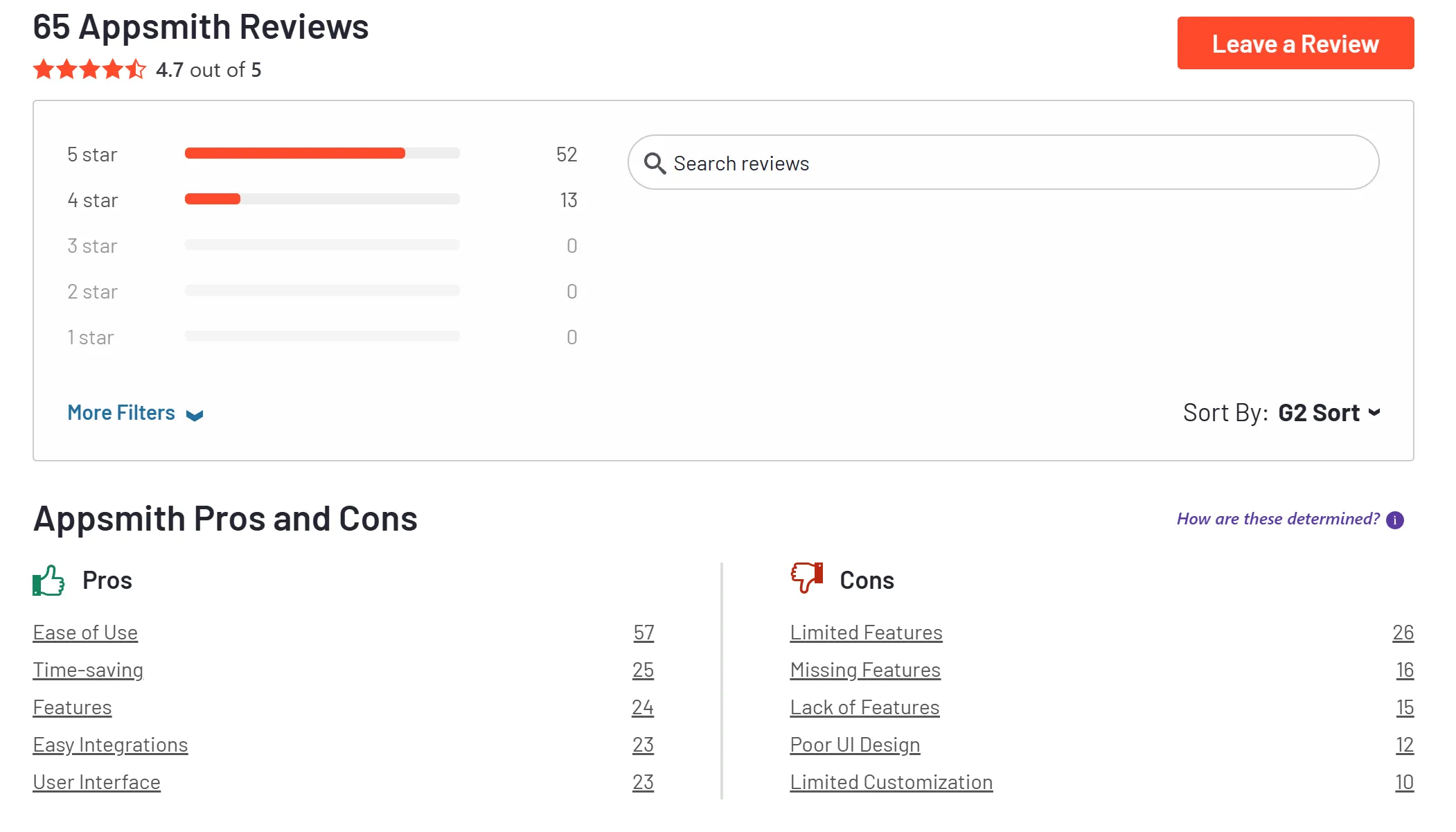
Appsmith has 4.7 out of 5 stars on G2. The majority of users like its ease of use and drag-and-drop UI.
Backend or full-stack developers appreciate how Appsmith enables rapid UI layer creation on top of databases and APIs. They say it is a good fit for internal tooling. However, it is not ideal for building customer-facing mobile apps.
Many users praise Appsmith for how fast projects come together. One builder reported launching a personal finance app within a day using the free tier and connecting to Supabase.
Users consistently highlight smooth connections to PostgreSQL, REST APIs, GraphQL, Supabase, and generative AI services like OpenAI and Anthropic. The process of setting up these integrations is often described as intuitive and hassle-free, even for non-technical users.
Some users flagged specific bugs, which can slow adoption for production use. Others noted that while developers can code custom logic, UI customization beyond standard widgets remains restricted.
Moreover, some users faced difficulties in communicating with the official support team. Community forums and documentation remain primary help sources.
Low-code development experts
Low-code platforms make development more accessible, cost-effective, and efficient for everyone, including startups and large enterprises. But to unlock their full potential, quite often the help of experienced developers familiar with low-code tools is required.
That’s where we enter the game. With over 10 years of software development experience, we can support your project at any stage. Some of our team members have even contributed to the development of low-code platforms themselves.
We can assist you not only in answering basic questions like "What is Appsmith?" or "How to use it?". We can also help you define the strategy for applying such a tool, building custom features, or integrating with your existing systems.
Ready to start? Contact our team to schedule a free consultation.
{{cta="/service-blocks"}}