


Wondering how much Retool costs and whether it's worth the investment? In this guide, we'll break down Retool pricing plans, hidden costs, and how it compares to other platforms. Our article aims to help you decide if Retool is the right fit for your team – and how to save along the way.
Is Retool free?
Retool offers a options for individuals, small teams, medium businesses and even Enterprise Plans. Its Free Plan is a solid starting point, but with limitations on features and capacity.
What’s Included in Retool’s Free Plan?
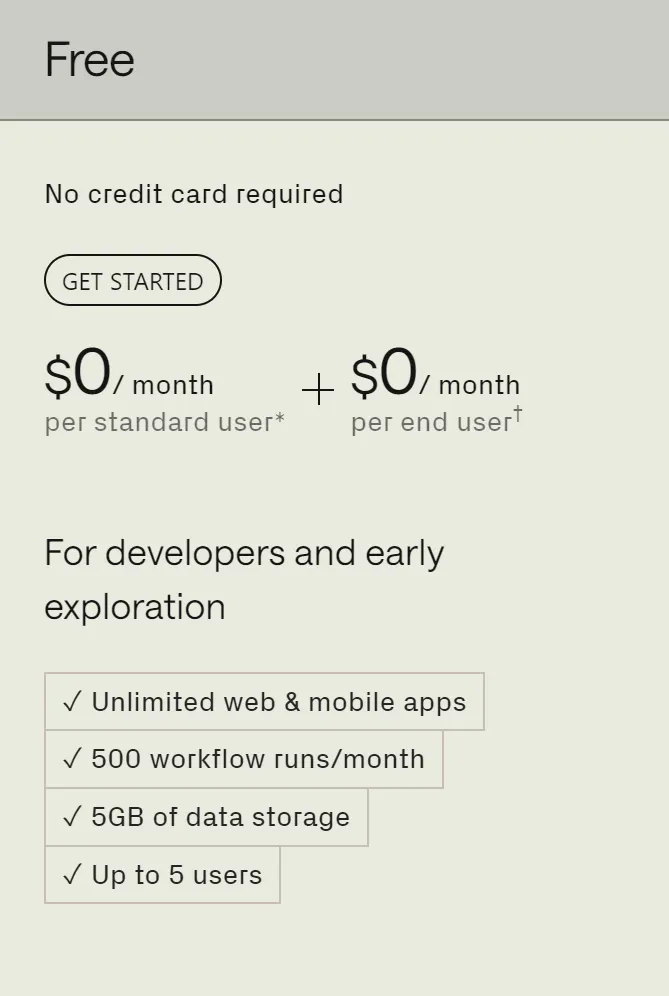
The Free Plan is designed to help small teams get started without any upfront costs. Here's what you get:
- Up to 5 standard app users – perfect for small teams or individuals building internal tools.
- Unlimited web and mobile apps – no restrictions on the number of build apps you can create.
- 500 workflow runs per month – enough for basic automation but limited for heavy use.
- 5GB of data storage – suitable for small-scale projects.
When Do You Need to Upgrade?
The Free Plan is a good starting point, but Retool is built for teams that want to scale. You'll need to upgrade to a Business and Enterprise plans if:
- Your team has more app users.
- You need features like role-based permissions, audit logging, or staging environments.
- Your workflows exceed 500 runs per month.
- You need additional storage for your data.
Retool Cost: A Clear Breakdown
Retool paid plans start at $10 per standard user per month and increase based on the features and scale your team needs. For growing organizations, there are Business and Retool's Enterprise pricing plans available to meet more advanced requirements. But before we dive into the details, let's break down another important part – the users – since understanding them is key to managing costs and choosing the right plan.
Retool User Roles
Retool categorizes active users into three roles, each with distinct functionality and pricing:
- Standard users: Builders and editors who create and manage web apps or workflows.
Example: A developer customizing an internal dashboard.
Cost: Included in the per-user pricing of Team and Business tiers – we'll share it a bit later.
- End users: Viewers who interact with apps but cannot modify them.
Example: A sales rep using a CRM tool built on Retool.
Cost: Lower per end user pricing compared to standard users.
- External users: Guests outside the organization who access embedded apps.
Example: A client viewing a shared reporting dashboard.
Cost: Typically requires Business or Retool's Enterprise plan.
Retool Paid Plans
Team
If your team is ready to move beyond testing and start building tools collaboratively, the Team Plan is a solid choice. It offers everything you need to efficiently develop, test, and manage internal web apps, without breaking the bank.
Pricing:
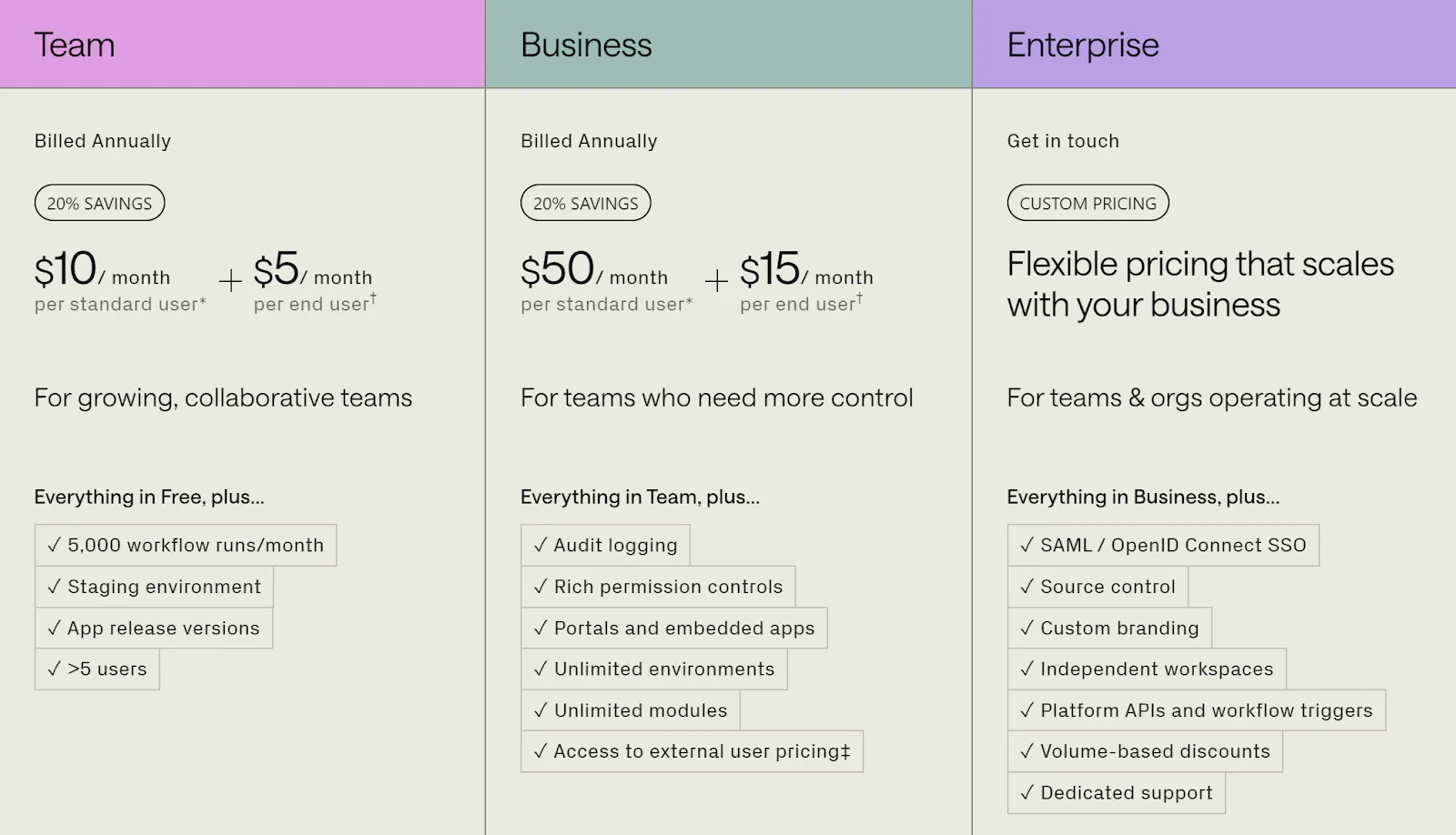
- $10 per standard user/month (billed annually) or $12/month (billed monthly).
- $5 per end user/month (billed annually) or $7/month (billed monthly).
Key features:
- 5,000 workflow runs per month to automate your processes without hitting limits too soon.
- A staging environment for testing apps before rolling them out.
- App release versions to track updates and manage changes seamlessly.
- Role-based permissions so you can control who edits, views, or interacts with your tools.
Best for: Small to medium-sized teams looking for collaboration tools and a cost-effective way to build web and mobile apps at scale.
Business
For growing organizations that need more control, flexibility, and security, the Business Plan introduces advanced tools to scale Retool workflows and manage larger demands.
Pricing:
- $50 per standard user/month (billed annually) or $65/month (billed monthly).
- $15 per end user/month (billed annually) or $18/month (billed monthly).
Key features:
- Unlimited environments for development, staging, and production.
- Audit logging to keep track of user actions and ensure compliance.
- Advanced permissions to manage access at a more granular level.
- Portals and embedded apps for external users like clients or vendors.
- Custom branding so your web and mobile apps align with your company's identity.
Best for: Medium to large organizations needing advanced control, robust security, dedicated support and tools for scaling operations.
Enterprise
Retool's Enterprise Pricing Plan is the most comprehensive offering, built for large-scale organizations with complex workflows, strict compliance needs, and a demand for tailored solutions.
Pricing:
- Custom Retool pricing based on your team size and specific requirements (contact Retool's sales team for details).
Features: Everything in the Business Plan, plus:
- SAML/OpenID Connect SSO for secure, streamlined authentication.
- Source control integration to manage app versions effectively.
- Multi-instance deployments for distributed or large-scale teams.
- A dedicated account manager to provide tailored guidance and support.
- Custom integrations to adapt Retool to your unique business needs.
Best For: Enterprises that require tailored solutions, top-notch, security features, and premium support to handle complex operations.
Annual Billing Discounts
While monthly basis subscriptions may feel like a safer option, choosing an annual plan comes with a 20% discount – a significant saving for teams planning to use Retool long-term.For example:
- The Team Plan drops from $12/month to $10/month per user.
- The Business Plan reduces from $65/month to $50/month per user.
If you plan to use Retool long-term, choosing annual billing can save you money and make budgeting easier.
Retool's pricing seems straightforward, it's important to plan for additional costs that might come up as your needs evolve. These can add up, so keeping them on your radar and pricing changes early can help you avoid surprises later.
Here's what to watch out for:
1. Workflow run limits
2. Storage overages
3. External user access
4. Self-hosting costs
5. Advanced features
6. Support and customization costs
How to Plan for Hidden Costs
- Audit your needs: Regularly review your workflow usage, storage requirements, and the number of app users to anticipate overages.
- Evaluate long-term scalability: As your team grows, ensure you account for additional workflow runs, storage, or user costs.
- Consider self-hosting costs: If data compliance is critical, budget for self-hosting and DevOps expenses early on.
- Upgrade strategically: Assess whether upgrading plans or purchasing add-ons will offer better value for your needs.
{{form}}
Here are some practical tips to help you save on Retool pricing while still getting the most out of the platform:
1. Negotiate discounts
Retool offers opportunities for businesses to reduce costs through negotiations, particularly if you're considering a larger commitment. For example, you can opt for annual billing, leverage user count or try enterprise plans negotiations – these can lead to better terms.
2. Choose the right plan
Selecting the plan that matches your team's needs and managing your user roles wisely can help you avoid unnecessary costs. What's important is to:
- Evaluate user roles
- Start with the Team Plan and see how it goes
- Monitor workflow runs
- Consider alternatives for external user pricing
3. Plan for growth strategically
- Forecast your needs: Think about your team size and app usage over the next year. Choosing a higher-tier plan proactively might save more than adding features or users piecemeal later.
- Utilize free trials: Test advanced features or higher-tier plans during free trial periods to understand what you truly need before committing.
Bonus: Special Retool.com pricing
If you're a student, educator, nonprofit, or part of a startup, Retool has exciting offers tailored just for you. Here's what you can take advantage of:
- Nonprofit Program
Nonprofits can access up to 25 free seats on the Business Plan, which includes both standard and end users. This flexibility allows you to choose the combination of roles that best fits your team's needs.
Who can apply:
- Officially registered nonprofit organizations.
- Must use an official nonprofit email address for verification.
What will you get:
- A monthly billing credit of $1,625, covers up to 25 Business Standard users for free.
How to apply:
- Sign up for a free Retool organization (Cloud or Self-Hosted).
- Submit the Nonprofit Program Application.
- Once approved, upgrade to the Team or Business Retool pricing in your billing settings.
- Education Program
Retool supports learning and teaching with access to the cloud-hosted Business Plan or free version of the self-hosted Team Plan at no cost.
Who can apply:
- Current students or educators with a valid educational email address.
What will you get:
- 100% free access to the monthly Team or Business plan.
How to apply:
- Sign up for a free Retool organization (Cloud or Self-Hosted).
- Submit the Education Program Application.
- Once approved, upgrade to the Team or Business plan in your billing settings.
- Startups
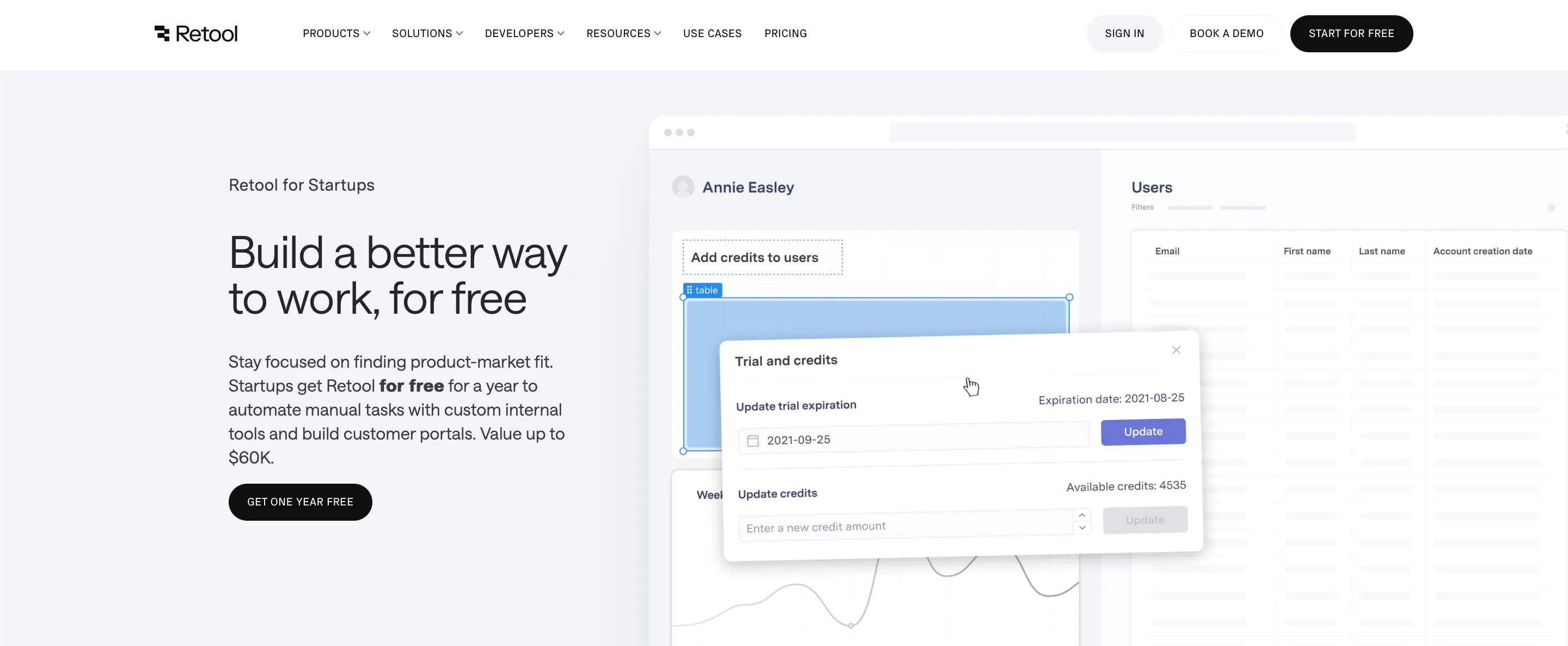
If you're a startup, Retool offers up to $25,000 in credits for one year to help you get started.
Who can apply:
- Startups less than 10 years old.
- Companies with less than $10 million in total funding.
- Businesses that are new Retool customers on monthly Team or Business plans.
- Eligible funding stages: bootstrapped, angel-funded, debt-funded, pre-seed, seed, or Series A.
What will you get:
- 100% discount for the first year on Retool's Team or Business plan (up to a $60,000 value).
- 25% discount for the second year.
How to apply:
- Sign up for a free Retool organization (Cloud or Self-Hosted).
- Upgrade to the monthly Team or Business plan.
- Submit the Startup Program Application.
- Once approved, the discount is automatically applied to your first invoice.
A more comprehensive guide and FAQ you can find here.
{{cta="/service-blocks"}
The Bottom Line
If Retool pricing model is a concern, or if you're unsure whether it's the right platform for your needs, we've got plenty of resources to help you decide.
Check out our blog for more practical tips and insights on Retool. And if you need personalized guidance for retool worth your project, our team of experts is here to help. Just hit the link to contact us.